 FieldCamp
Departments in FieldCamp
Learn what departments are in FieldCamp, how a department goes from Pending setup to Active, and what each department holds: a manager, job types and people.
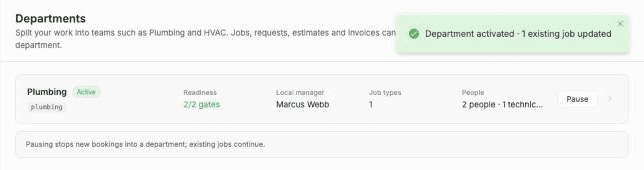
Departments split your work into lines of business, such as Plumbing, HVAC or Electrical. You set them up under Settings > Company > Departments. In FieldCamp's words, "Jobs, requests, estimates and invoices can be tagged and filtered by department."
You don't need the Franchise add-on to use departments. Any company can create its own. If you run several branches with Franchise HQ, you can also define departments once at HQ and roll them out across branches.
Watch: Departments in FieldCamp
A one-minute look at what departments do: every trade in one account, each with its own team, job types and numbers.
What a department holds
Each department has its own setup page. On it you set:
- Identity: the department's name, trade, work class, reporting code and default customer segments.
- Local manager: the person who approves department changes on jobs in pipeline stages that need approval.
- Job types: the job types that book into this department.
- People: the dispatchers and technicians who work in it.
- Service areas: the areas the department covers, so the job address can help pick a department.
- Default warehouse: where parts for this department's jobs come from first.
- Assignment rule: what happens when someone outside the department is assigned to its work.
The department people, service areas and assignment rules guide explains each of these settings.
How a department goes live
A department moves through these states:
| State | What it means |
|---|---|
| Pending setup | The department exists, but it doesn't have a local manager and at least one job type yet. |
| Ready to activate | Both requirements are met. Nothing books into it until you activate it. |
| Active | The department is live. |
| Paused | No new bookings go into the department. Existing jobs continue. |
The two requirements are a Local manager and At least one job type connected. Service areas and technicians are recommended, but a department can go live without them.
When you activate a department, FieldCamp offers to set it on open jobs that don't have a department yet and whose job type belongs to it. Closed and invoiced jobs are never changed. See create and activate a department for the full steps.
What departments don't do
Departments organize, filter and assign work. They don't change who can open a job; your roles and permissions still control that.
There is one exception: custom object records that are limited to certain departments stay hidden from people outside those departments. A role with Sees every department's records turned on can see all of them. See pause, rename and department permissions.
Who can set up departments
To open Settings > Company > Departments and change department setup, you need permission to manage system settings. Owners and admins have it.
Related articles
Plans & Pricing | FieldCamp
Compare FieldCamp's Pro, Growth, Scale, and Enterprise plans. See included users, AI features, and what each tier covers. Pricing is custom to your team and workflow. Manage your subscription in Settings.
How to create and activate a department
Create a department in FieldCamp, assign its local manager and job types, then activate it and choose whether to apply it to jobs that are already open.