 FieldCamp
Requests & Pipeline Overview | FieldCamp
Requests capture incoming leads and service inquiries before they become scheduled jobs. Track every opportunity through a visual sales pipeline in FieldCamp.
Under the hood — see how Requests work in the FieldCamp data model: the fields they hold, how they connect to your other records, and how to customize them.
What Are Requests?
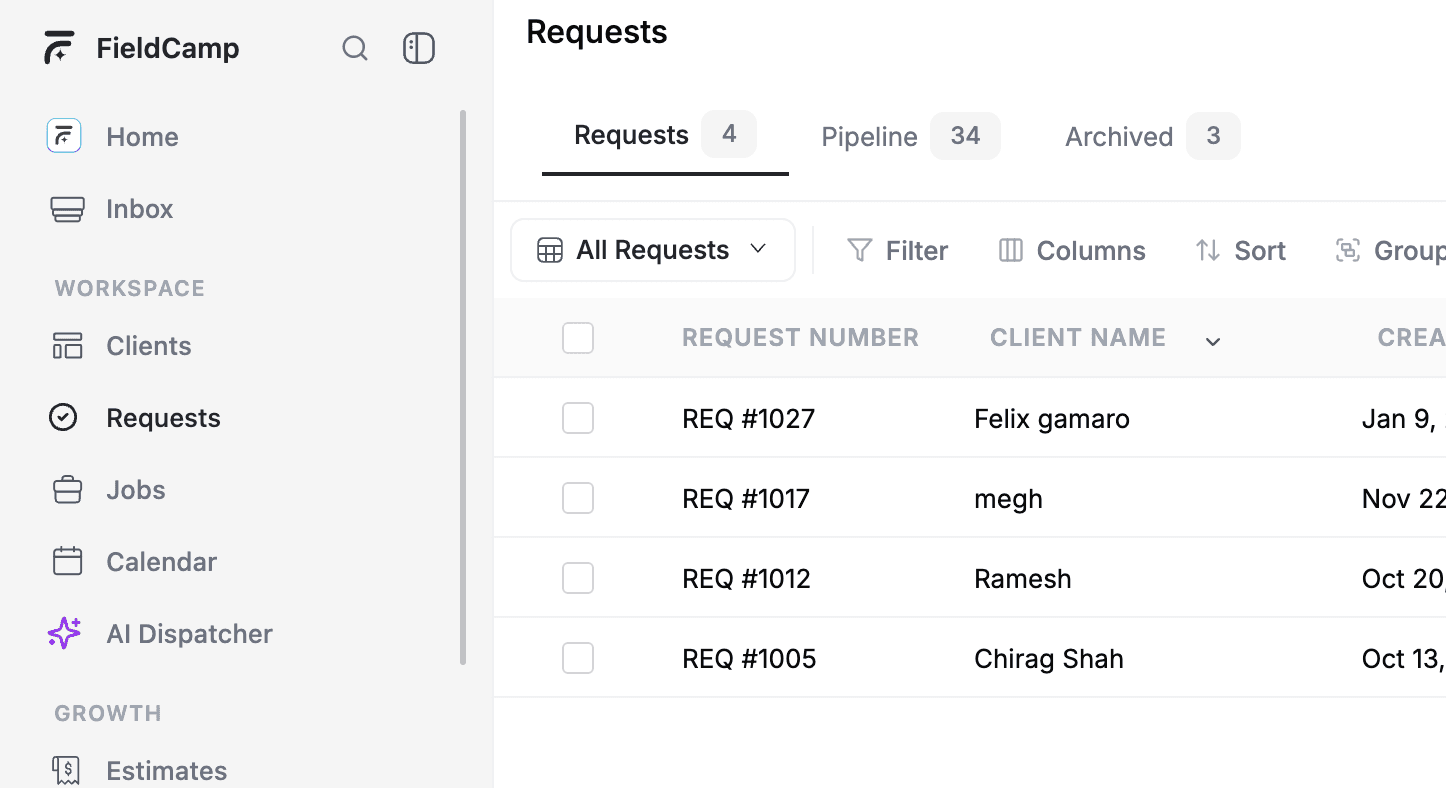
Requests are the starting point for every customer interaction in FieldCamp. When someone calls about a leaky faucet, emails for an HVAC inspection, or books online for a lawn treatment — that incoming inquiry becomes a request.
Requests live separately from jobs. A request is a lead or inquiry that has not yet been scheduled or confirmed. A job is confirmed work with a team member assigned, a date set, and line items ready. The pipeline bridges the gap between the two.
How Requests Differ from Jobs
| Request | Job | |
|---|---|---|
| Stage | Lead or inquiry — before confirmation | Confirmed work — ready for scheduling |
| Purpose | Capture, qualify, and follow up on incoming work | Schedule, assign, and complete the work |
| Pipeline | Moves through sales stages (New, Inspection, Quote) | Moves through job stages (Scheduled, In Progress, Completed) |
| Conversion | Converts into a job, estimate, or invoice | Generates visits, invoices, and reports |
The Sales Pipeline
The pipeline is a visual kanban board that shows every request as a card, organized into columns by stage. Drag cards between columns to advance requests through your sales process — from initial inquiry to converted job.
Default stages include:
- New Request — just created, no action taken
- Inspection Scheduled — site visit booked
- Quote Created — estimate prepared
- Converted — turned into a job or estimate
You can customize stages, colors, and transition rules in Pipeline Configuration.
Where Requests Come From
Requests enter FieldCamp from multiple sources:
- Phone call — your team creates a request manually after taking a call
- Online booking — a customer submits a request through your booking widget
- Manual entry — any team member creates a request from the Requests page
- AI Command Centre — type a natural language command to create a request instantly
- Voice agent — a FieldCamp Voice agent creates a request during a call. See Look up clients and jobs during a call
AI-First: Use the Command Centre
Open the Command Centre and type what you need:
- "Create a request for Sarah Johnson — she needs her AC inspected"
- "Show me all new requests from this week"
- "How many requests are in the Quote Created stage?"
The AI creates the request, sets the right stage, and links the client record — all from one sentence. See AI Skills for the full list of request commands.
The Request Lifecycle
Every request follows a natural path from inquiry to completion:
- Capture — a request is created from a call, booking, or manual entry
- Qualify — your team reviews the request and gathers details
- Inspect — schedule a site visit or assessment if needed
- Quote — create an estimate for the customer
- Convert — turn the approved request into a job or estimate
- Close — the request moves to Converted and stays as a historical record
Enabling the Pipeline: The Sales Pipeline is an add-on feature. Go to Settings > Add-ons, find the Sales Pipeline add-on, and click Enable. Once enabled, the Pipeline tab appears in the Requests section of your sidebar.
What You Can Do in This Section
- Create and track requests — add new requests manually or via AI, and manage them in table view
- Request detail page — view full request info, notes, line items, and take actions
- Sales pipeline kanban — visualize your pipeline and drag requests between stages
- Pipeline stages and configuration — customize stages, transitions, and automation rules
- Converting requests — turn qualified requests into jobs, estimates, or invoices
Requests vs. the Client Pipeline: FieldCamp has two pipelines. The Request Pipeline tracks service inquiries (New Request > Inspection > Quote > Converted). The Client Pipeline (Sales Pipeline) tracks client relationships (New Lead > Contacted > Won > Active Client). Both are configured in Settings > Pipeline Config.
Related Articles
- Creating and Tracking Requests — add new requests manually, via AI, or from online bookings
- Sales Pipeline Kanban — visualize your pipeline on a drag-and-drop board
- Pipeline Stages and Configuration — customize stages, transitions, and automation rules
- Converting Requests — turn qualified requests into jobs, estimates, or invoices
- Command Centre — manage requests with AI chat commands
FieldCamp Troubleshooting: Common Issues & Fixes
Fix login, sync, email, and integration issues in FieldCamp. Step-by-step troubleshooting for Stripe, QuickBooks, Google Calendar, and mobile app errors.
Creating & Tracking Requests | FieldCamp
Create service requests manually, via AI chat, or from online bookings. Track, filter, and manage every incoming inquiry in FieldCamp's request pipeline.