 FieldCamp
Job & Visit Statuses | FieldCamp
Understand FieldCamp's two-level job and visit statuses, the Unscheduled and On Hold branches, visit filter tabs, and how pricing or email visibility is gated.
Under the hood — see how Stages & Workflows work in the FieldCamp data model: the fields they hold, how they connect to your other records, and how to customize them.
FieldCamp uses a two-level status system to track field service work. Job (work order) statuses track the overall lifecycle of a service agreement. Visit statuses track each individual appointment within that job. Together, the job and visit statuses give your office and field teams a clear picture of where every piece of job (work order) stands, including when work is paused, queued for scheduling later, or being dispatched by AI.
Ask the AI
You can check or update statuses through the Command Centre:
- "What's the status of the Smith Residence HVAC job?"
- "Mark today's visit for Sarah Johnson as completed"
- "Show me all jobs that are in progress"
- "Put the Acme retrofit job on hold while we wait for parts"
Job Statuses
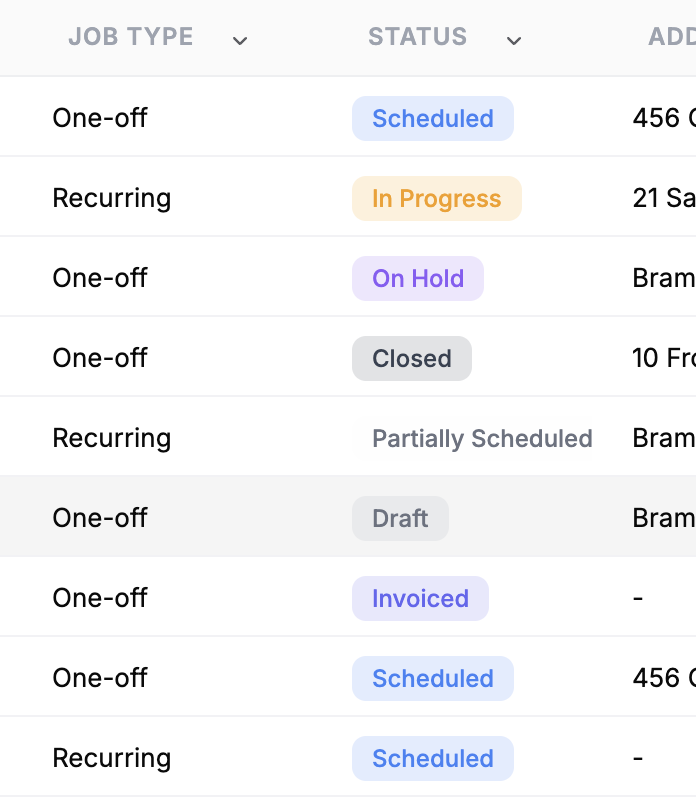
| Status | Meaning | What Triggers It |
|---|---|---|
| Draft | Job created but no visits scheduled yet, or job created with the "Schedule later" option | Creating a job without scheduling, or toggling Schedule later |
| Scheduled | One or more visits are booked, work has not started | Scheduling the first visit |
| In Progress | At least one visit is actively being worked | A visit moves to In Transit, Arrived, or Work in Progress |
| On Hold | Job is paused for any reason — parts, customer delays, follow-up needed | Manually placed on hold |
| Completed | All visits finished, billing pending | All active visits marked Completed (or Completed and Cancelled mix) |
| Invoiced | An invoice has been generated for the job | Creating an invoice from the job |
| Paid | Payment received in full | Recording payment on the invoice |
| Cancelled | Job cancelled, all visits cancelled | Manually cancelling the job |
| Closed | Fully settled and archived | Closing a paid job |
Partially Scheduled is a separate status used only for jobs that go through the AI Dispatcher. It applies when some visits inside a job have been accepted to the schedule but other suggestions are still pending review or unassigned. It does not appear for jobs scheduled manually or via the calendar.
Job Status Flow
Draft → Scheduled → In Progress → Completed → Invoiced → Paid → Closed
   ↓        ↓            ↓
On Hold   On Hold    On Hold
   ↓        ↓            ↓
(Can be Cancelled at most stages)
A job that is On Hold can return to Draft, Scheduled, or In Progress, depending on whether any visits are still booked. A Cancelled job can be revived back to Draft or Scheduled if work resumes.
Visit Statuses
Each visit within a job tracks its own progress independently of the job status.
| Status | Meaning | What Triggers It |
|---|---|---|
| Unscheduled | Visit exists but has no date or time set | Created from a "Schedule later" job, or saved without a start time |
| Scheduled | Booked for a specific date and time | Setting the visit start date and time |
| In Transit | Team is traveling to the job site | Technician marks departure |
| Arrived | Team is on-site, preparing to begin | Technician confirms arrival |
| Work in Progress | Service is actively being performed | Technician starts work |
| Completed | Visit finished successfully | Technician marks work as done |
| Cancelled | Visit will not be performed | Manually cancelling the visit |
Visit Status Flow
Unscheduled → Scheduled → In Transit → Arrived → Work in Progress → Completed
                 ↓            ↓           ↓             ↓
              Cancelled    Cancelled   Cancelled     Cancelled
The Unscheduled Branch (Schedule Later)
When you create a job and choose Schedule later, FieldCamp does the following:
Job lands in Draft
The job is saved without a start time, so the job status starts as Draft and stays there until a visit is booked. See Schedule Later & Visit Schedule Links for the full workflow.
Visit sits in Unscheduled
Any visit on that job is created in the Unscheduled state — it has no visitStartDateTime yet and is not on the Calendar. Unscheduled visits show up in the dispatch queue until they are booked.
Book it from the job page or calendar
Open the job, set a start date and time on the visit, and assign a technician. The visit flips to Scheduled and the job moves to Scheduled. You can also drag it from the Job Tray to a calendar slot.
This branch is useful when a customer wants service but hasn't picked a date, when you're waiting on parts, or when a sales rep takes the order but dispatch will book it later.
Visit Filter Tabs
The Visits tab on the job detail page has a row of filter chips so you can focus on a specific stage of work. The filters available adapt to the actual visits on the job — you only see chips for statuses that exist on that job, plus All and Late.
| Chip | Shows |
|---|---|
| All | Every visit on the job, including Unscheduled visits |
| Late | Visits whose start time has passed but that are not yet Completed or Cancelled |
| Scheduled | Visits booked for a date and time but not started |
| In Transit | Visits where the team has departed |
| Arrived | Visits where the team is on-site |
| Work in Progress | Visits being actively worked |
| Completed | Finished visits |
| Cancelled | Cancelled visits |
Unscheduled visits only show under the All chip. They are intentionally hidden from the status-specific filter tabs so dispatchers don't confuse "not yet booked" with "scheduled for today and running late."
The chip count next to each label reflects only the visits that match — so if your job has 6 visits but only 4 are scheduled and 2 are completed, you'll see "Scheduled (4)" and "Completed (2)".
How Job and Visit Statuses Work Together
The job status updates automatically based on the collective status of its visits:
| Scenario | Result |
|---|---|
| All visits are Scheduled | Job is Scheduled |
| Any visit moves to In Transit, Arrived, or In Progress | Job becomes In Progress |
| All visits are Completed | Job moves to Completed |
| Some visits Completed and the rest Cancelled | Job moves to Completed |
| All visits Cancelled | Job becomes Cancelled |
| Job is manually placed on hold | Job becomes On Hold regardless of visit states |
| Job has an invoice attached | Job becomes Invoiced |
Single-visit jobs — the visit and job statuses stay closely aligned. Completing the visit completes the job.
Multi-visit jobs — the job remains In Progress until every visit is either Completed or Cancelled. Individual visits can be at different statuses simultaneously. See the multi-day jobs overview for examples.
Recurring jobs — the job stays In Progress through multiple visit cycles. You can invoice periodically while the recurring job remains active, and it closes only when the recurring schedule ends.
FieldCamp handles most status transitions automatically. You can also change statuses manually when needed — for example, putting a job On Hold while waiting for a part, or reopening a Cancelled visit to reschedule it.
Pricing and Email Visibility on Visit Detail
Visit details respect role-based permissions, so technicians on lower-tier roles see a streamlined view without sensitive financial or contact data.
- Pricing visibility — gated by the
Jobs.showPricingpermission. Users without it (and without admin) do not see line-item pricing, totals, job income, or cost/profit numbers on the visit detail page. Admins always see pricing. - Client email visibility — gated by the
Clients.viewPropertiespermission. Lite-tier roles see the client's name and phone for the job, but not the email. Pro-tier and above (which carryviewProperties) see the full contact card.
Both gates apply only to the visit detail page UI — the underlying data is still attached to the job and is visible to any role with the right permission. Review the roles and permissions guide and your team setup to confirm which roles in your account carry these capabilities.
Automatic Status Transitions
Job-level automation:
- Draft to Scheduled — when the first visit is scheduled
- Scheduled to In Progress — when any visit begins (In Transit, Arrived, or Work in Progress)
- In Progress to Completed — when all active visits are completed (or completed and cancelled)
- Completed to Invoiced — when an invoice is created from the job
- Invoiced to Paid — when payment is recorded
- Paid to Closed — when the job is formally closed
- Any → On Hold — when a user manually pauses the job
- Any → Cancelled — when the job is cancelled (all active visits also cancel)
Visit-level automation:
- Unscheduled to Scheduled — when a date and time are set
- Scheduled to In Transit — when the team marks departure
- In Transit to Arrived — when the team confirms arrival
- Arrived to Work in Progress — when work begins
- Work in Progress to Completed — when the team finishes work
Best Practices
- Update statuses in real time — especially visit statuses on mobile so office staff and clients stay informed
- Use On Hold instead of Cancelled — when work is just paused, On Hold keeps the visits on the calendar history and is easy to reactivate
- Review completed jobs daily — do not let unbilled work pile up
- Close paid jobs promptly — keeps your active job list clean and reporting accurate
- Use the visit filter chips — the Late chip is the fastest way to spot visits the field team hasn't started on time
- Reschedule cancelled visits quickly — use the Calendar and conflict detection tools to find the next available slot
- Use job notes — document the reason whenever you manually change a status, especially On Hold or Cancelled
Troubleshooting & FAQs
Why does my job stay in Draft after I added a visit?
The visit is probably still Unscheduled — open the visit and set a start date and time. Draft jobs flip to Scheduled only when at least one visit has a real start datetime.
Where do my Unscheduled visits appear?
They show only under the All chip on the job's Visits tab. They are hidden from the Scheduled, Late, and other status-specific filter chips so dispatchers don't mistake unbooked work for late work.
Why don't I see Partially Scheduled in my regular jobs?
Partially Scheduled is an AI Dispatcher status. It only appears for jobs that were submitted to the AI Dispatcher and where some visit suggestions have been accepted while others are still pending. Manually scheduled jobs use the standard Draft → Scheduled → In Progress flow.
Why doesn't a technician see pricing or the client's email on the visit page?
The visit detail page checks two role permissions: Jobs.showPricing for pricing and Clients.viewProperties for client contact details like email. If their role doesn't include these, the fields are hidden by design. Promote their role or update permissions to expose those fields.
Can I put a job On Hold and still keep visits on the calendar?
Yes. On Hold is a job-level state that doesn't auto-cancel visits. You can leave booked visits in place if you expect the hold to lift soon, or cancel them individually if you need the slot back on the calendar.
My visit was Cancelled by mistake. Can I bring it back?
Yes. Open the visit and change its status. From Cancelled you can return to Scheduled. The parent job will recalculate its own status based on the updated visit mix.
Related Articles
- Job Management — A Complete Guide
- How to Schedule Jobs in FieldCamp
- Understanding Visits
- Job Detail Page
- Multi-Day Jobs Overview
- Recurring Jobs
- Schedule Later & Visit Schedule Links
- Calendar Overview
- Unscheduled Visits & the Dispatch Queue
- Creating Invoices from Jobs
- Roles and Permissions
- What is AI Dispatcher
- Command Centre AI Chat
Job Management Overview | FieldCamp
Learn how FieldCamp organizes field service work into jobs (work orders) and visits, with AI-powered scheduling, financial tracking, and team coordination built in.
Creating a Job | FieldCamp
Learn how to create one-time and recurring jobs (work orders) in FieldCamp using the AI Command Centre or the manual stepped modal with client, schedule, and team details.