 FieldCamp
What is AI Dispatcher? | FieldCamp AI Dispatcher
AI Dispatcher automatically matches jobs to the right technicians using skills, location, and availability. The only tool with multi-day route chaining, capacity-based dispatching, and hierarchical skill matching.
What is AI Dispatcher?
AI Dispatcher is an intelligent job assignment system that automatically matches service jobs to the right technicians based on skills, location, availability, and schedule constraints. Instead of spending hours manually building daily routes and assignments, dispatchers receive optimized recommendations in seconds -- complete with confidence scores and detailed reasoning for every suggestion. For a broader look at the concept, see our guide on what an AI dispatcher actually is.
AI Dispatcher is available in two ways:
- Standalone app at dispatcher.fieldcamp.ai -- a dedicated dispatch workspace with its own login, dashboard, and focused workflow
- Inside FieldCamp at app.fieldcamp.ai -- as an add-on that integrates AI suggestions directly into your existing job and calendar flow
Both versions use the same AI engine. To understand the differences, see Standalone vs Inside FieldCamp.
What Makes AI Dispatcher Different
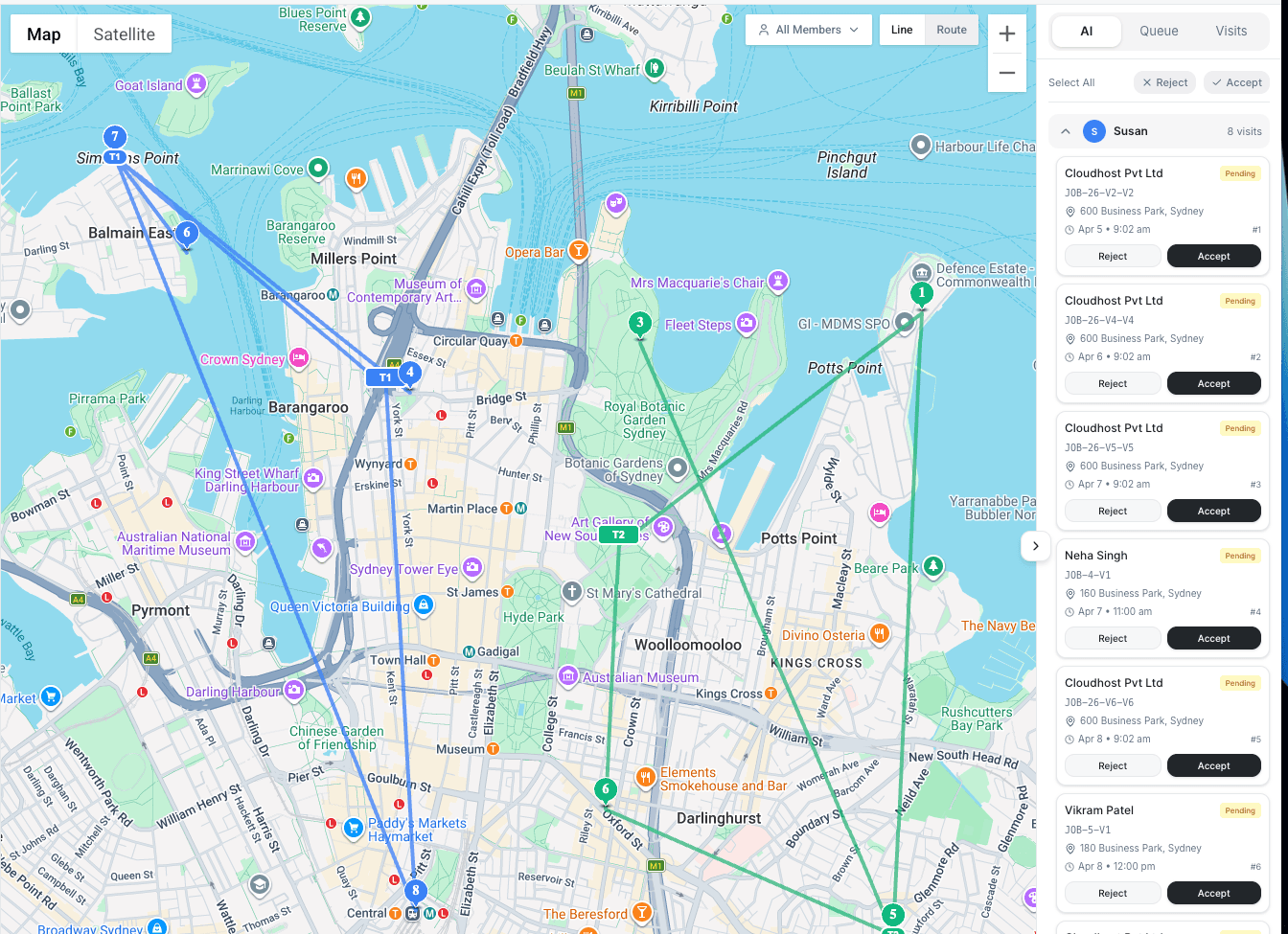
Most dispatch tools assign jobs one at a time. AI Dispatcher looks at the full picture -- your entire team, all pending jobs, multiple days ahead -- and finds the best assignment for every job simultaneously. Here is what no other tool does:
Multi-Day Route Chaining
A large job that takes three days to complete? AI Dispatcher plans all three days as a connected route, not three separate assignments. It accounts for where the technician will be at the start of each day and builds the most efficient path across the entire job.
Capacity-Based Dispatching
This goes beyond "max 6 jobs per day." For a grease trap company, the dispatcher tracks tank capacity on the vacuum truck and routes it back to the dump site when the tank reaches 80-90% full. For other businesses, it tracks billable hours, drive time, and prevents overtime before it happens.
Hierarchical Skill Matching
Skills are not just flat labels. A Level 3 telematics technician is qualified for Level 1 and Level 2 work. An HVAC tech with "Commercial Install" might not have "EPA Certified." The skill hierarchy reflects how your team actually works -- not just a list of tags.
Job Splitting Across Days
An 8-device installation does not have to happen in one marathon day. AI Dispatcher can split it across two days, and it is smart enough to never split mid-device. Day one gets 5 devices, day two gets 3 -- with a clean break between them.
Test With Your Real Data
Before you commit, you can upload your actual jobs and technician data and see exactly how AI Dispatcher would handle your schedule. No fake demos, no generic scenarios -- your real business, your real complexity.
Works With Your Existing Tools
AI Dispatcher connects to Jobber, ServiceTrade, Google Calendar, Housecall Pro, FieldEdge, QuickBooks, and FieldCamp. Jobs sync automatically, suggestions flow back. No need to replace what is already working. See Connectors & Integrations.
The Six Main Pages
The standalone AI Dispatcher app is organized into six pages, each handling a distinct part of the dispatch workflow:
| Page | Purpose |
|---|---|
| Jobs | Create, import, and manage all service jobs waiting for dispatch. Learn about creating jobs or importing from a spreadsheet. |
| Schedule | View your team's calendar with confirmed assignments and pending AI suggestions side by side. See Understanding the Calendar View. |
| Live Dispatch | The core dispatch screen where AI analyzes unassigned jobs and generates technician recommendations on a map and timeline. See Live Dispatch Map & Timeline. |
| Agents | Configure AI dispatch agents that can run in auto mode for hands-off dispatching. See Dispatch Agents. |
| Technicians | Manage your team profiles, skills, service areas, and availability. See Setting Up Your Team. |
| Analytics | Track dispatch performance, acceptance rates, and team utilization. See Analytics Dashboard. |
How It Works
When a job needs assignment, the AI engine evaluates your entire team in real time:
- Job comes in -- A new service request is created or imported into AI Dispatcher
- AI analyzes the match -- The engine scores every available technician against the job's requirements, considering skills, proximity, current workload, time windows, and route efficiency
- Suggestion with confidence score -- You receive a recommendation rated 0-100% with a detailed breakdown of why that technician was chosen
- You decide -- Review the suggestion, then accept, reject, or reassign
Every suggestion includes a confidence score and reasoning panel so you can see exactly why the AI picked a specific technician. No black-box decisions.
Key Capabilities
Intelligent Matching
- Skills-based assignment -- Never send the wrong technician. The AI checks certifications, specialties, and experience against job requirements.
- Location-aware routing -- Minimizes travel time by considering real driving distances, not straight-line calculations.
- Workload balancing -- Distributes jobs evenly across your team to prevent overloading any single technician.
Confidence Scores and Reasoning
- 0-100% confidence for every recommendation, built from five weighted factors: skills match, proximity, availability, workload, and route efficiency
- Detailed reasoning panel explains strengths and concerns for each suggestion
- Alternative technicians ranked by confidence so you always have options
Auto Mode
- Dispatch agents can run autonomously, automatically assigning jobs that meet your confidence threshold without manual review
- Configure rules for which jobs qualify for auto-dispatch and which require human approval
- Ideal for high-volume operations or after-hours scheduling
Conflict Detection
- Prevents double-bookings by checking existing schedules before suggesting assignments
- Flags impossible travel times between back-to-back jobs
- Alerts when suggestions fall outside customer-requested time windows
Credits System
- AI Dispatcher uses a credits-based system for AI-powered suggestions
- Dispatch credits are included when you create your account
- Credits are consumed when the AI engine generates dispatch recommendations
AI Dispatcher works alongside your team -- it handles the computational heavy lifting while you maintain final control over every assignment.
Who Should Use AI Dispatcher?
If you are evaluating whether AI-powered dispatching is right for your operation, our article on why AI dispatching matters covers the business case in detail.
AI Dispatcher is built for field service businesses that:
- Dispatch multiple technicians daily -- Where manual scheduling creates bottlenecks
- Manage teams with varied skills -- Electricians, plumbers, HVAC techs, or any mix of specialties
- Serve time-sensitive customers -- With strict appointment windows and service level requirements
- Want to scale operations -- Without hiring additional dispatch staff
- Run specialized equipment -- Pump trucks, install vehicles, or service vans with physical capacity limits
Common industries include HVAC, plumbing, electrical, grease trap and waste hauling, telematics and device installation, property maintenance, IT field services, and medical equipment servicing.
Get Started
Create your account or enable the add-on inside FieldCamp.
Understand which version is right for your team.
Configure your team's skills, availability, and service areas.
Deep dive into the AI engine and scoring algorithm.
Related Articles
- Signing Up & Getting Access
- Configuring Skills & Capabilities
- Reviewing AI Suggestions
- AI Dispatcher FAQs
- AI Dispatcher Inside FieldCamp — use AI dispatching directly within FieldCamp's job management
- Book and dispatch jobs during a call — in the FieldCamp Voice docs, let a voice agent book jobs through AI Dispatcher during a call
Further Reading
- What is an AI Dispatcher? -- A deep dive into the concept of AI-powered dispatching
- Why AI Dispatching Matters -- The business case for replacing manual dispatch workflows
- AI Dispatching vs Traditional Dispatch Software -- How AI dispatching compares to conventional scheduling tools
AI Dispatcher Docs | FieldCamp AI Dispatcher
Complete documentation for AI Dispatcher — intelligent job-to-technician matching available standalone at dispatcher.fieldcamp.ai or inside FieldCamp.
Sign Up for AI Dispatcher | FieldCamp AI Dispatcher
Access AI Dispatcher as a standalone app at dispatcher.fieldcamp.ai or enable it as an add-on inside FieldCamp. Dispatch credits are included when you create your account.