 FieldCamp
AI Dispatcher FAQs | FieldCamp AI Dispatcher
Frequently asked questions about FieldCamp's AI Dispatcher — speed, overrides, learning, emergencies, security, integrations, and ROI for field service teams.
AI Dispatcher FAQs
New to AI Dispatcher? Start with the What is AI Dispatcher overview before diving into the FAQs below.
Quick answers to common questions about FieldCamp's AI Dispatcher. Access it at dispatcher.fieldcamp.ai or as an add-on inside app.fieldcamp.ai. For detailed setup instructions, see the main AI Dispatcher Guide.
How fast does AI Dispatcher assign jobs?
Under 2 seconds for single assignments. AI Dispatcher analyzes technician availability, skills, location, and historical patterns in real-time. Bulk imports or schedule reorganizations take 5-10 seconds depending on complexity.
Industry context: Traditional manual dispatching averages 3-5 minutes per job. AI Dispatcher's speed means you can handle urgent calls and schedule changes without bottlenecks.
Can I override AI recommendations?
Yes, always. AI Dispatcher suggests—you decide. Manually reassign any job, adjust schedules, or ignore suggestions entirely. You stay in control.
The system learns from your overrides. If you consistently assign HVAC installs to your senior technician, AI Dispatcher incorporates that pattern into future recommendations. See Reviewing AI Suggestions for the full review workflow.
Does it learn from my decisions?
Yes, continuously. AI Dispatcher uses machine learning to improve over time based on:
-
Manual assignment patterns
-
Preferred technician-job pairings
-
Scheduling preferences
-
Customer-technician history
The more you use it, the better it understands your business—like which techs excel at commercial jobs or your preferred routing patterns.
How does it handle emergency jobs?
Immediate reprioritization. Mark a job as urgent, and AI Dispatcher instantly identifies the nearest qualified available technician. It shows you schedule adjustment options and the impact on existing appointments—you make the final call. Learn more about the strategy behind this in our article on emergency job handling.
Industry context: Emergency response time directly impacts customer retention. Fast, smart emergency dispatch can turn a crisis into a loyalty moment.
What about scheduling conflicts?
Automatic detection and smart resolution. AI Dispatcher flags overlapping appointments immediately and shows you:
-
Affected technicians
-
Conflict details
-
Rescheduling options
Choose to reassign, adjust time slots, or keep the conflict if there's a valid reason.
Can I automate dispatching completely?
Yes, with guardrails. Dispatch Assistants are AI agents that auto-dispatch jobs based on playbooks you define. You configure confidence thresholds, job type filters, and guardrails (escalate exceptions, explain recommendations, gate external actions) so routine jobs get dispatched without manual approval while edge cases still come to you.
Does it support recurring jobs and maintenance contracts?
Yes. Set up recurring appointments (weekly, monthly, quarterly) and AI Dispatcher automatically schedules future occurrences. For maintenance contracts, it considers customer preferences and assigns consistent technicians when possible — building customer relationships through familiarity.
How does it learn my business rules?
Multiple learning channels:
-
Observation: Tracks your manual assignment patterns
-
Explicit rules: Set hard rules like "Tech A only works commercial" or "Tech B never on weekends"
-
Feedback: Learns when you accept or override suggestions
-
Historical data: Analyzes past successful assignments
Learning is continuous and adapts as your business evolves.
What if a technician calls in sick?
Instant reassignment suggestions. Mark a technician unavailable, and AI Dispatcher immediately:
-
Identifies all affected jobs
-
Suggests optimal reassignments (skills, location, workload)
-
Shows customer impact
Review and approve changes before notifying customers—no surprises, smooth continuity.
Industry context: Unplanned absences cost field service companies an average of $500-$2,000 per day in lost productivity. Fast reassignment minimizes that hit.
Can I see why AI recommended a specific technician?
Full transparency. Every recommendation shows:
-
Skill match percentage
-
Estimated travel time
-
Current workload
-
Customer-technician history
-
Weighted factors that influenced the decision
Click any suggestion to see the reasoning. Understanding the logic helps you trust the system and make better decisions. For a deep dive into the scoring algorithm, see How AI Dispatcher Works Under the Hood.
How accurate is travel time calculation?
Typically within 10-15% of actual time. AI Dispatcher uses:
-
Real-time traffic data
-
Historical traffic patterns for scheduled time (not just current conditions)
-
Technician starting locations
-
Multi-stop route optimization
Industry context: Inaccurate travel estimates lead to missed time windows and frustrated customers. AI Dispatcher's routing reduces drive time by 15-20% on average.
Where can I see dispatch performance metrics?
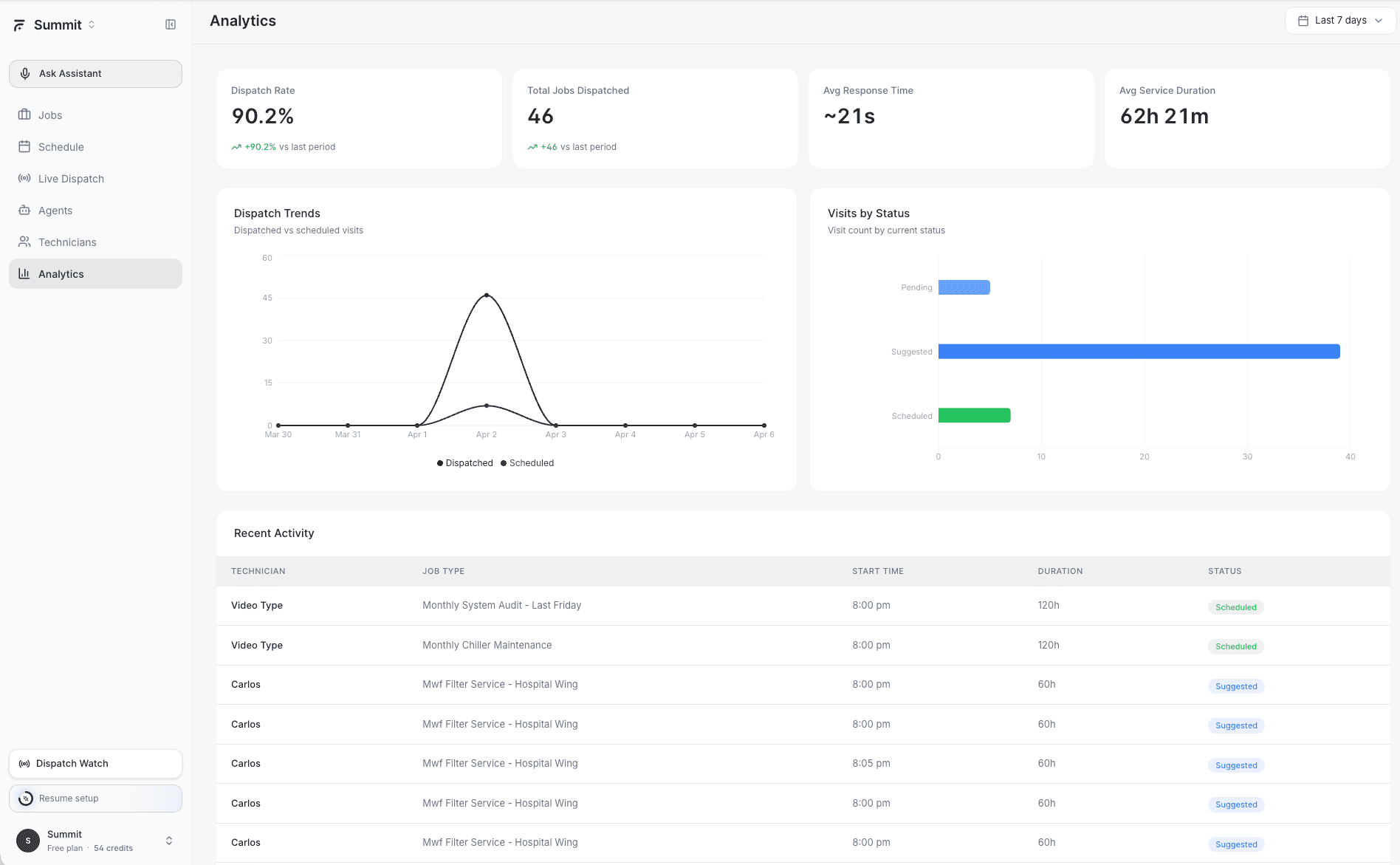
On the Analytics Dashboard. It shows Dispatch Rate %, Total Jobs Dispatched, Avg Response Time, and Avg Service Duration. You also get trend charts for dispatched vs scheduled visits and a breakdown of visits by status.
Can AI Dispatcher work without FieldCamp?
No. AI Dispatcher is a FieldCamp enhancement — it requires an active FieldCamp account. It integrates deeply with FieldCamp data (jobs, technicians, schedules, customers) and syncs all assignments back to FieldCamp in real-time. Access it at dispatcher.fieldcamp.ai (standalone) or inside app.fieldcamp.ai.
Is there a mobile app?
Web-based, fully responsive. Access AI Dispatcher at dispatcher.fieldcamp.ai through any browser on desktop, tablet, or smartphone. No dedicated app currently, but the web interface is optimized for mobile dispatching on the go.
How secure is my data?
Enterprise-grade security:
-
Encryption: TLS 1.3 in transit, AES-256 at rest
-
Compliance: SOC 2 Type II certified
-
Authentication: Secure login system (your FieldCamp credentials are never stored separately)
-
Privacy: We never share, sell, or use your data beyond providing the service
Does it integrate with other software?
Currently FieldCamp only. We've focused on delivering the deepest, most seamless experience within the FieldCamp ecosystem. Additional integrations may come based on customer demand.
What happens during downtime?
Your operations continue normally. AI Dispatcher is built for 99.9% uptime, but if service is interrupted, dispatch directly through FieldCamp as usual. AI Dispatcher is an enhancement layer, not a replacement.
When service resumes, everything syncs automatically. We provide real-time status updates via our status page and email notifications.
How fast can I see ROI?
Most customers see results in 2-4 weeks. Typical improvements:
-
15-20% reduction in drive time
-
10-15% increase in jobs per technician per day
-
Significant reduction in dispatcher workload
Industry context: For a 10-technician operation, that translates to 8-12 additional jobs per week—often $15,000-$30,000 in monthly revenue without adding headcount.
Your ROI timeline depends on current routing efficiency, team size, and service area. Our onboarding team provides customized ROI projections. You can also try our AI Dispatcher ROI Calculator to estimate savings for your specific operation.
Related Articles
- What is AI Dispatcher?
- Dispatch Assistants (AI Agents)
- Analytics Dashboard
- Accepting or Rejecting AI Dispatch Suggestions
- When the AI Dispatcher Can't Find a Technician
- Understanding the Schedule View
- How AI Dispatcher Works Under the Hood
Further Reading
- AI Dispatcher ROI Calculator — Estimate how much time and money AI dispatching can save your operation
- Emergency Job Handling — How AI reprioritizes schedules when urgent jobs come in
Still have questions? Contact our support team or check the full AI Dispatcher Guide.