 FieldCamp
Service Areas & Zones | AI Dispatcher
Define where your technicians work on a map. Draw service areas, assign technicians to geographic zones, and let AI Dispatcher handle optimized routing.
Define Where Your Team Works
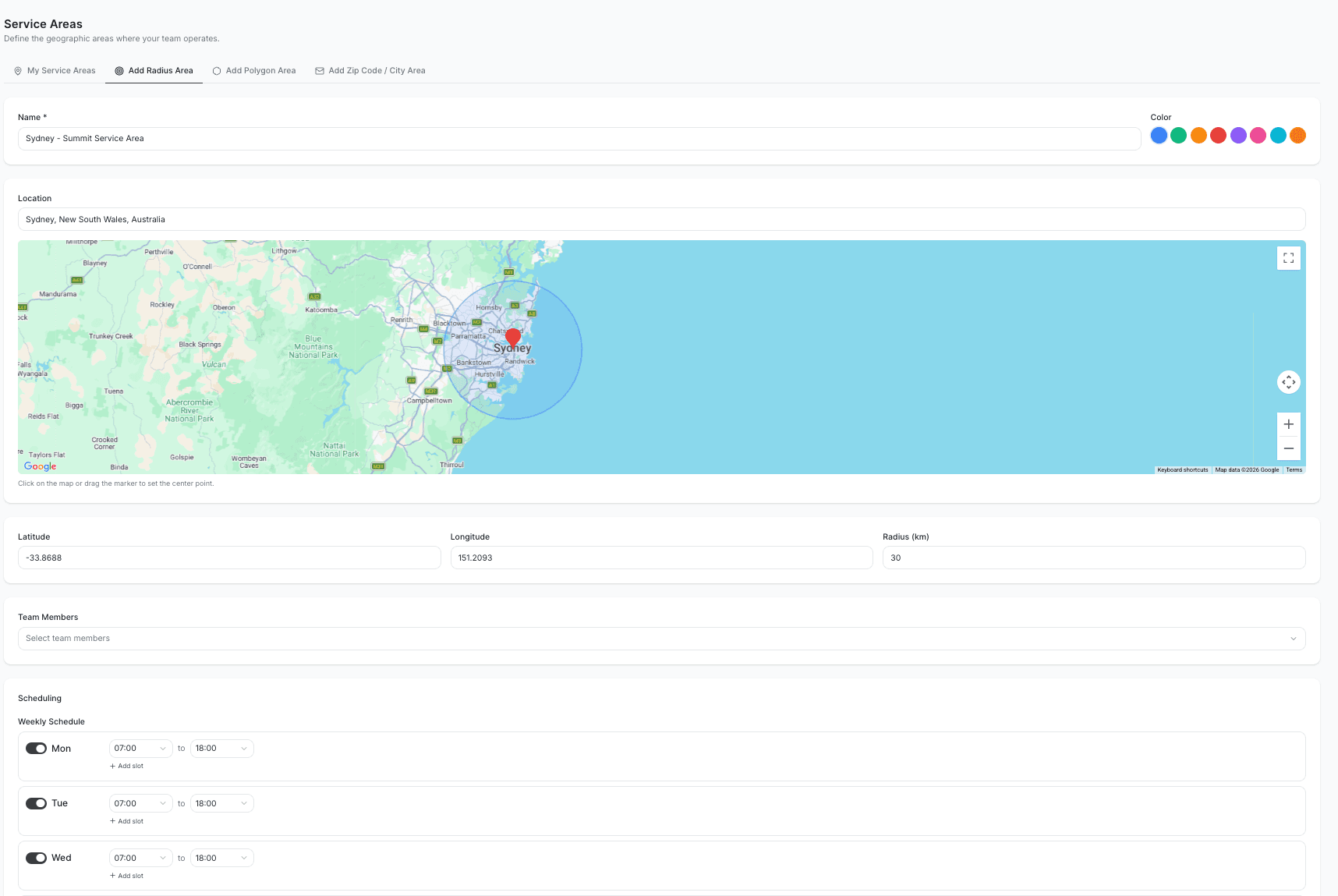
Your technicians do not cover the entire planet. They work in specific neighborhoods, cities, or regions -- and AI Dispatcher needs to know those boundaries so it sends the right person to each job.
Service areas and zones let you draw those boundaries on a map and assign technicians to them. Once set up, the dispatcher only considers technicians who work in the area where the job is located.
How It Works
Draw Your Service Area
Start by defining where your business operates:
- Set a radius around your home base -- for example, 50 kilometers around your office in Sydney
- Draw custom boundaries for irregularly shaped coverage areas
- Any job outside your service area gets flagged so you can decide whether to take it
Create Zones Within Your Area
Break your service area into named zones that match how your team actually operates. For example:
A grease trap company in New York might have three zones:
- Brooklyn -- Carlos and his truck cover all Brooklyn pickups
- Manhattan -- Susan handles Manhattan, where parking is a nightmare and she knows every loading dock
- New Jersey -- Mike covers the NJ restaurants across the river
An HVAC company in Dallas might split by region:
- North Dallas -- Two technicians covering residential neighborhoods
- Downtown -- One commercial specialist handling office buildings
- South Dallas -- Two technicians covering a mix of residential and light commercial
Assign Technicians to Zones
Open each technician's profile and assign them to one or more zones:
- Carlos is assigned to Brooklyn only
- Susan is assigned to Manhattan only
- A senior tech might be assigned to Brooklyn and Manhattan for overflow coverage
Once zones are set, AI Dispatcher enforces them strictly. A job in Brooklyn will never be assigned to Susan, even if she is closer that day. Carlos covers Brooklyn -- that is the rule.
Why Zones Matter
Zones are not just about geography -- they solve real business problems:
- Technicians learn their territory -- Carlos knows every building super in Brooklyn. Susan knows which Manhattan buildings require advance elevator reservations. That local knowledge makes them faster and more effective.
- Shorter drive times -- Keeping technicians in their zone means less time on the road and more time on the job.
- Franchise and territory agreements -- If you operate across franchise boundaries or have contractual territory limits, zones enforce them automatically.
- Licensing and regulations -- Some regions require different licenses or certifications. Zones ensure only properly licensed technicians work in those areas.
Travel Time Within Zones
Even within a single zone, AI Dispatcher calculates real driving distances and times between jobs. It is not drawing straight lines on a map -- it accounts for actual road routes and estimated drive times.
If two back-to-back jobs are too far apart for the technician to make it in time, the dispatcher flags a travel conflict. This prevents impossible schedules where a technician would need to teleport between appointments.
A technician 10 miles away by road might be closer in actual drive time than one 5 miles away through congested city streets. The dispatcher accounts for this.
When No One Covers the Zone
If a job comes in for a zone where no technician is available (everyone is booked, on vacation, or the zone has no assigned technicians), the job shows as Unassigned with a clear reason.
You can resolve this by:
- Temporarily assigning a technician from a neighboring zone
- Rescheduling the job to a day when the zone has coverage
- Expanding a nearby technician's zone assignment
Combining Zones with Everything Else
Zones work alongside all other dispatch rules:
- Zones + Skills -- A technician must be in the right zone AND have the required skills. Carlos covers Brooklyn and has confined space certification? He gets the underground grease trap job. If he does not have that certification, the job goes to someone else in Brooklyn who does.
- Zones + Capacity -- A technician must be in the right zone AND have room in their schedule. If Carlos has already hit his daily limit, the job waits or goes to another Brooklyn technician.
- Zones + Drive Time -- Even within the correct zone, travel time between jobs is still checked. No impossible routes.
When You Might Not Need Zones
If your service area is small enough that any technician can reach any job within a reasonable drive time, you may not need zones at all. The drive time calculations handle geographic efficiency on their own.
Zones become valuable when:
- Your team covers a large metro area or multiple cities
- You have territorial agreements or franchise boundaries
- Different areas require different licenses or certifications
- You want technicians to build deep familiarity with their neighborhoods
Related Articles
- Setting Up Your Team
- Multi-Day & Travel Setup
- Skills & Hierarchical Skills
- Handling Conflicts & Overlaps
- Live Dispatch Map & Timeline
Further Reading
- Zone and Territory Constraints -- Strategies for dividing service areas and enforcing geographic rules
- How AI Reduces Drive Time -- Why geographic optimization matters for field service efficiency
- Time Window Optimization -- How zones interact with customer appointment windows
Business Schedule & Working Hours | FieldCamp
Configure your company's weekly working hours and date-specific exceptions so AI Dispatcher only suggests jobs when your business is open.
Skills, Equipment & Tags | AI Dispatcher
Set up skills, equipment, and tags so AI Dispatcher only sends qualified technicians to each job. Real examples from HVAC, grease trap, and telematics industries.