 FieldCamp
Standalone vs Inside FieldCamp | AI Dispatcher
Compare AI Dispatcher as a standalone app at dispatcher.fieldcamp.ai versus the integrated add-on inside FieldCamp. Same AI engine, different workflow options.
Standalone vs Inside FieldCamp
AI Dispatcher is available in two forms: a standalone app at dispatcher.fieldcamp.ai and an add-on inside FieldCamp at app.fieldcamp.ai. Both use the same AI engine for intelligent job-to-technician matching. The difference is where you work and how deep the integration goes.
This guide helps you decide which version fits your team — or whether to use both.
Standalone App (dispatcher.fieldcamp.ai)
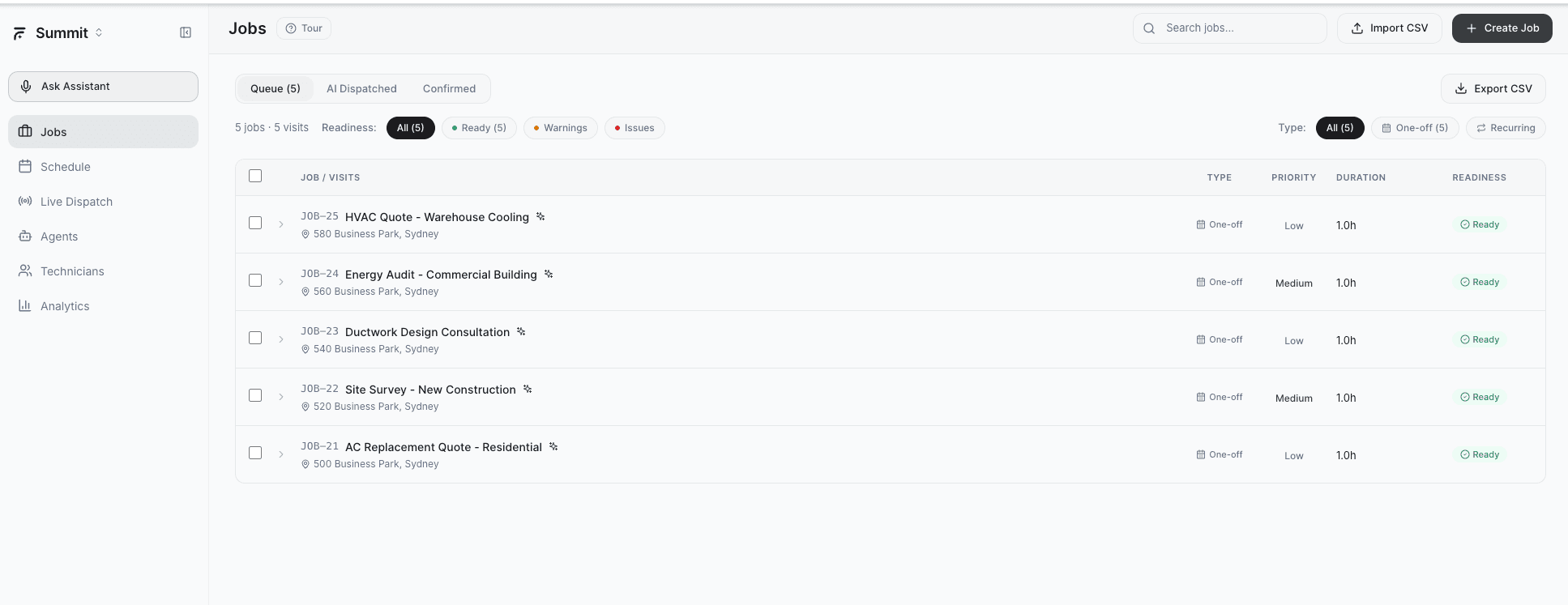
The standalone app is a dedicated dispatch workspace built entirely around AI-powered job assignment. It has its own login, dashboard, and six focused pages.
What you get:
| Page | Description |
|---|---|
| Login | Own login at dispatcher.fieldcamp.ai/login -- uses the same login as your FieldCamp account |
| Jobs | Create, import, and manage jobs independently. Import from CSV for bulk operations. |
| Schedule | A dispatch-focused calendar view showing confirmed and pending assignments |
| Live Dispatch | The core AI screen with map and timeline for real-time dispatch decisions |
| Agents | Configure autonomous dispatch agents that assign jobs without manual review |
| Technicians | Manage team profiles, skills, and availability in one place |
| Analytics | Track dispatch performance and team utilization metrics |
Best for:
- Dispatch-focused teams where the primary job is assigning technicians to work orders
- Companies testing AI dispatch before committing to full FieldCamp adoption
- Dedicated dispatchers who need a streamlined interface without the broader field service management tools
- Multi-platform users who manage jobs in another system but want AI-powered dispatch
Inside FieldCamp (app.fieldcamp.ai)
The in-app version runs as an add-on within your existing FieldCamp workspace. AI dispatch suggestions appear alongside your jobs, calendar, clients, and invoicing — no context switching required.
What you get:
| Feature | Description |
|---|---|
| No separate login | Access through your existing FieldCamp dashboard at app.fieldcamp.ai |
| AI suggestions in job flow | When a job needs assignment, AI recommendations appear directly within the job detail and calendar views |
| Integrated data | Uses your existing FieldCamp clients, job types, team members, and calendar without re-entry |
| Unified workflow | Dispatch, invoicing, client communication, and reporting all in one place |
Best for:
- Full-suite FieldCamp users who already manage jobs, clients, and invoicing in FieldCamp
- Operations managers who want AI dispatch alongside other business tools
- Teams that prioritize integration over a dedicated dispatch interface
- Companies with established FieldCamp workflows who want to add intelligence without changing processes
You do not have to choose one or the other. Both versions share the same account with shared login credentials. Some teams use the standalone app for dedicated dispatchers and the in-app version for managers who need the full picture.
Side-by-Side Comparison
| Feature | Standalone App | Inside FieldCamp |
|---|---|---|
| URL | dispatcher.fieldcamp.ai | app.fieldcamp.ai |
| Login | Own login page (same FieldCamp credentials) | Existing FieldCamp login |
| AI Engine | Same | Same |
| Dispatch Map & Timeline | Dedicated Live Dispatch page | Integrated into job/calendar views |
| Job Management | Built-in Jobs page | Uses existing FieldCamp jobs |
| Technician Profiles | Built-in Technicians page | Uses existing FieldCamp team members |
| Analytics | Dedicated Analytics page | Dispatch metrics within FieldCamp reporting |
| Autonomous Agents | Dedicated Agents page | Available as add-on feature |
| Client & Invoice Management | Not included (dispatch-focused) | Full FieldCamp suite |
| Credits System | Yes | Yes |
Same AI Engine Behind Both
Regardless of which version you use, the underlying dispatch intelligence is identical:
- Same confidence scoring — 0-100% with five weighted factors (skills, proximity, availability, workload, route efficiency)
- Same reasoning panels — Detailed strengths and concerns for every suggestion
- Same conflict detection — Double-booking prevention, impossible travel alerts, time window checks
- Same skills matching — Certifications and specialties evaluated the same way
The only difference is the interface and integration depth.
Your AI dispatch history and technician configurations sync between both versions. Changes made in the standalone app reflect inside FieldCamp and vice versa.
Which Should You Choose?
Start with the standalone app if:
- You want a focused dispatch tool without the full field service suite
- You have a dedicated dispatcher role on your team
- You are evaluating AI dispatch before adopting FieldCamp
Start with the in-app version if:
- You already use FieldCamp for job and client management
- You want AI suggestions woven into your existing workflow
- You prefer a single platform for all operations
Use both if:
- Your dispatchers need a focused interface while managers use the full suite
- You want the Live Dispatch map for real-time decisions and FieldCamp for everything else
To get started with either option, see Signing Up & Getting Access.
Related Articles
- What is AI Dispatcher?
- Signing Up & Getting Access
- Live Dispatch Map & Timeline
- AI Dispatcher FAQs
- AI Dispatcher Inside FieldCamp — how the add-on works within FieldCamp's job management module
Sign Up for AI Dispatcher | FieldCamp AI Dispatcher
Access AI Dispatcher as a standalone app at dispatcher.fieldcamp.ai or enable it as an add-on inside FieldCamp. Dispatch credits are included when you create your account.
Workspaces | AI Dispatcher
Create and manage AI Dispatcher workspaces, set a name, slug and timezone, and understand what stays scoped to each workspace.