 FieldCamp
Skills, Equipment & Tags | AI Dispatcher
Set up skills, equipment, and tags so AI Dispatcher only sends qualified technicians to each job. Real examples from HVAC, grease trap, and telematics industries.
Why Skills Matter
Every field service business has jobs that require specific qualifications. You would never send an apprentice to a complex commercial install, or a residential-only tech to a confined space job. Skills in AI Dispatcher make sure that never happens.
When a job comes in, the dispatcher checks which skills that job requires, then only considers technicians who have every one of those skills. No exceptions, no guesswork.
Set up your skill hierarchy before importing jobs. Accurate skills are the single biggest factor in AI Dispatcher's matching quality.
Skills Are Not Just Labels -- They Form a Hierarchy
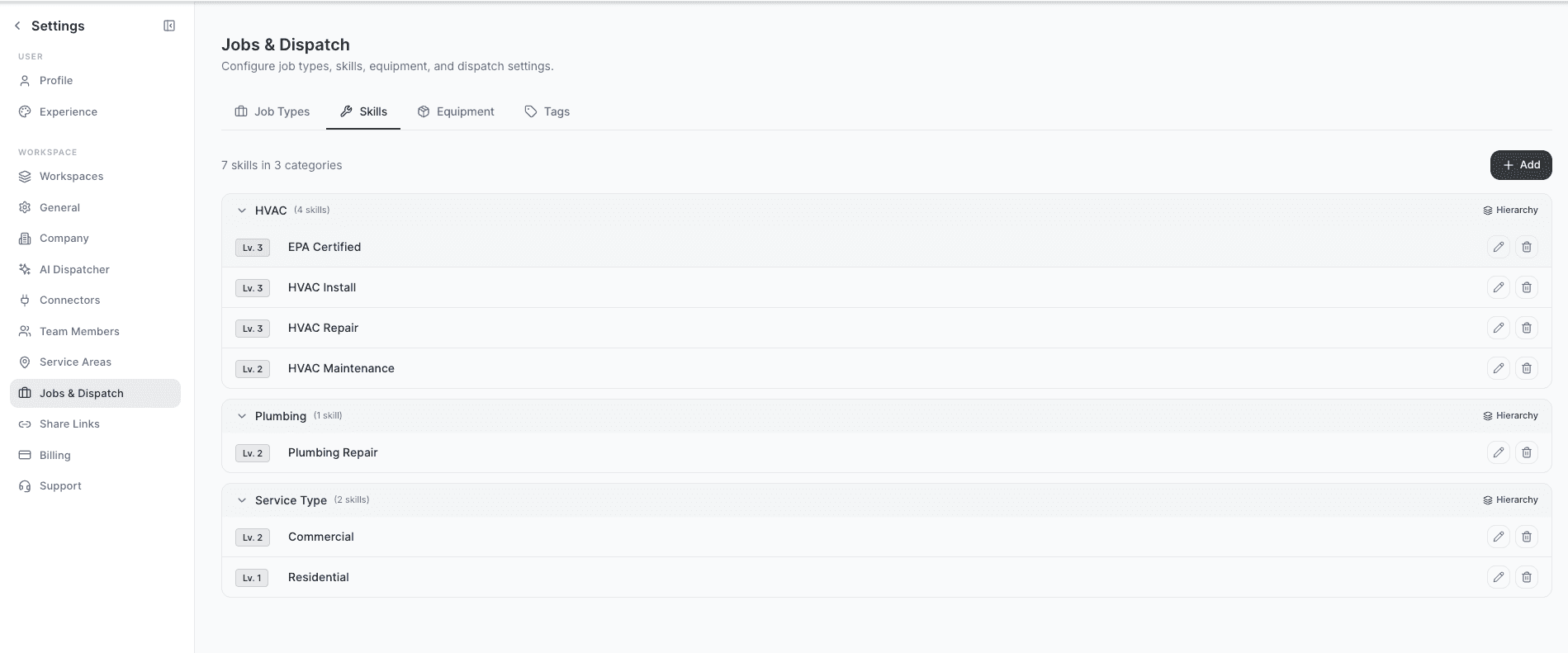
Most businesses organize their skills into categories and sub-categories. AI Dispatcher supports this with a skill tree -- a structured hierarchy that reflects how your team actually works.
Here is what that looks like in practice:
HVAC Company
Your skill tree might look like this:
- HVAC (category)
- HVAC Repair
- HVAC Install
- HVAC Maintenance
- EPA Certified
- Commercial
- Residential
A technician with "HVAC Install" on their profile can handle installations -- but that does not automatically mean they have "EPA Certified." Those are separate skills. If a job requires both "HVAC Install" and "EPA Certified," only technicians who have both checked off will be considered.
Grease Trap / Waste Hauling Company
Your jobs might require a combination of:
- CDL certification (commercial driver's license for the truck)
- Confined space entry (safety certification for underground work)
- FOG compliance (fats, oils, and grease regulations)
Not every driver on your team has confined space entry certification. AI Dispatcher knows this and will only send qualified crew members to jobs that require it.
Telematics / Device Installation Company
You might have three tiers of technicians:
- Level 1 -- Basic installs (GPS trackers, dash cameras)
- Level 2 -- Intermediate installs (hardwired systems, multi-sensor setups)
- Level 3 -- Advanced installs (fleet-wide deployments, custom wiring)
A Level 3 technician is qualified for Level 1 and Level 2 work as well. When you set up the hierarchy, Level 3 automatically includes the lower levels -- so when a simple Level 1 job comes in, your Level 3 tech is still in the running. But a Level 1 tech will never be assigned a Level 3 job.
This matters for efficiency too: the same install might take a Level 1 technician 90 minutes but a Level 3 technician only 45 minutes.
Setting Up Your Skill Tree
Go to Settings > Jobs & Dispatch > Skills tab to build your hierarchy.
How to Create Skills
- Go to Settings > Jobs & Dispatch > Skills tab
- Click Add Category to create a top-level group (e.g., "HVAC")
- Click into the category and add individual skills (e.g., "HVAC Repair," "EPA Certified")
- Repeat for each category your business needs
Example: An HVAC and Plumbing Company
HVAC (category)
- HVAC Repair
- HVAC Install
- HVAC Maintenance
- EPA Certified
- Commercial HVAC
- Residential HVAC
Plumbing (category)
- Residential Plumbing
- Commercial Plumbing
- Water Heater Install
- Drain Cleaning
- Backflow Certification
Service Type (category)
- Emergency Response
- Preventive Maintenance
- New Construction
Keep the names consistent across your organization. "HVAC Repair" and "AC Repair" look like different skills to the system, so pick one name and use it everywhere.
Assigning Skills to Technicians
Once your skills are created, assign them to each technician based on their real qualifications:
- Open the technician's profile
- Go to the Skills section
- Check off every skill they are qualified to perform
- Save the profile
Be thorough. If a technician can do HVAC installs, repairs, and maintenance, make sure all three are on their profile. The dispatcher only considers skills that are explicitly assigned -- it does not assume that someone who can do installs can also do repairs.
Example Skill Profile: Senior HVAC Technician
- EPA Certified
- HVAC Repair
- HVAC Install
- HVAC Maintenance
- Commercial HVAC
- Residential HVAC
- Emergency Response
Example Skill Profile: Junior Plumbing Technician
- Residential Plumbing
- Drain Cleaning
- Preventive Maintenance
Setting Up Equipment
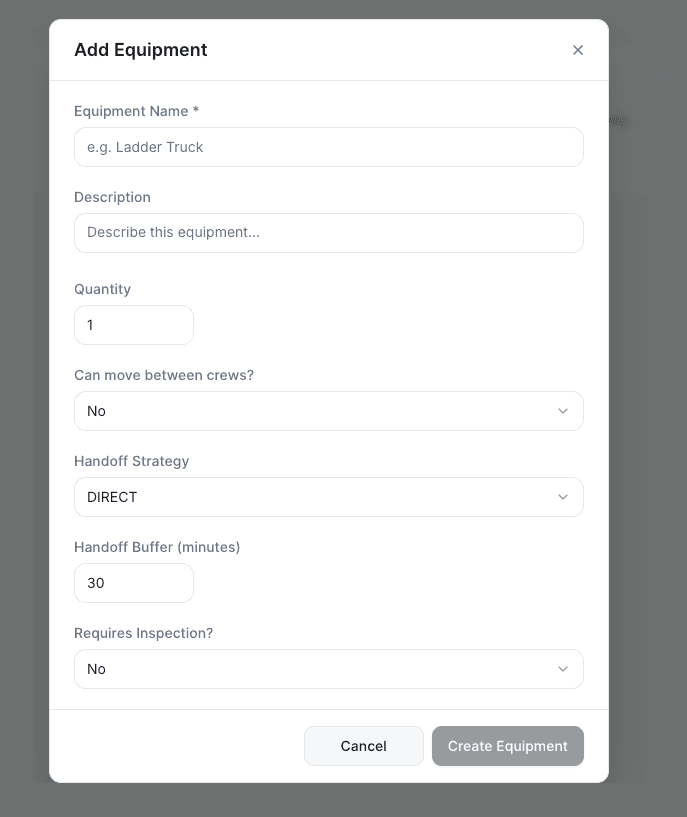
Some jobs require specific tools or vehicles, not just skills. The Equipment tab lets you track what each technician has access to:
- Ladder truck -- Needed for high-rise or rooftop work
- Vacuum truck -- Required for grease trap and waste hauling jobs
- Specialized diagnostic tools -- Thermal cameras, leak detectors, electrical testers
- Heavy equipment -- Lifts, trenchers, generators
Add equipment in Settings > Jobs & Dispatch > Equipment tab, then assign the relevant items to each technician's profile. When a job requires specific equipment, only technicians who have it will be considered.
Using Tags to Link Labels and Skills
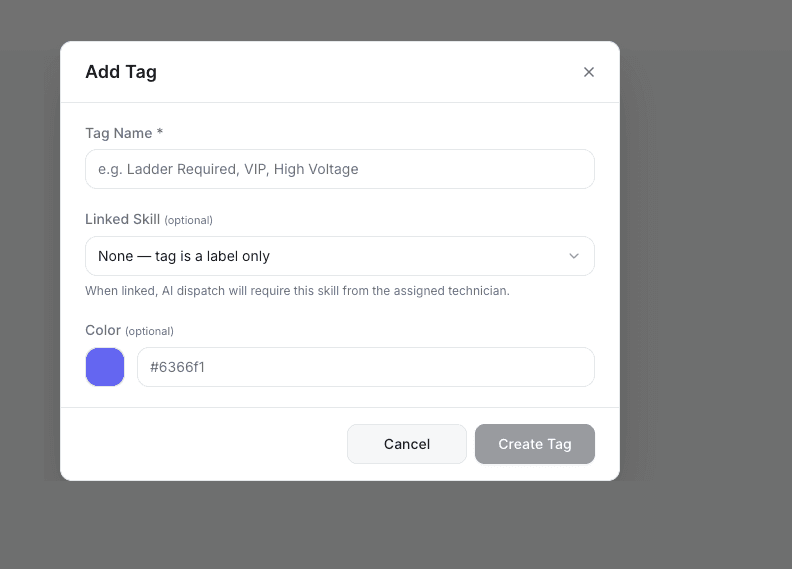
Tags are color-coded labels that help you organize jobs and technicians. What makes them powerful is that you can link a tag to a skill -- so when a job gets tagged, the skill requirement is automatically applied.
Examples of Useful Tags
| Tag | Linked Skill | Effect |
|---|---|---|
| "VIP Customer" | VIP Service | Only your most experienced technicians handle these accounts |
| "High Voltage" | Certified Electrician | Safety requirement is enforced automatically |
| "Confined Space" | Confined Space Entry | Certification required for the job |
| "Commercial" | Commercial | Filters out residential-only technicians |
Creating Tags
- Go to Settings > Jobs & Dispatch > Tags tab
- Click Add Tag
- Enter the tag name (e.g., "High Voltage")
- Choose a color for easy visual identification
- Optionally link it to a skill (e.g., "Certified Electrician")
- Save
When you tag a job with "High Voltage," the linked skill "Certified Electrician" is automatically required -- no need to manually add the skill to every job.
Linking Skills to Job Types
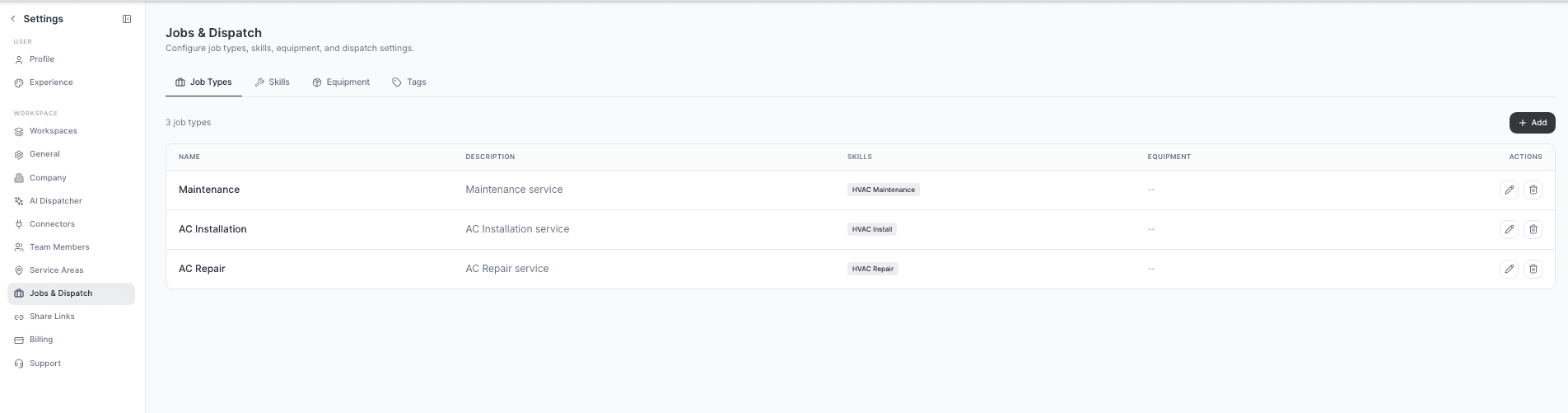
The final piece is connecting skills to your job types. When you create or edit a job type, specify which skills it requires:
- Go to Settings > Jobs & Dispatch > Job Types tab
- Open or create a job type (e.g., "Commercial AC Install")
- In the Required Skills section, select the skills needed (e.g., "HVAC Install," "EPA Certified," "Commercial HVAC")
- Save
Now every time a "Commercial AC Install" job comes in, AI Dispatcher automatically knows it needs a technician with all three of those skills. You set it up once and it works for every job of that type.
How It All Connects
Here is the complete flow from setup to dispatch:
- Create skill categories and skills in Settings > Jobs & Dispatch > Skills
- Add equipment that certain jobs require in the Equipment tab
- Create tags with linked skills in the Tags tab
- Assign skills and equipment to each technician's profile
- Set required skills on each job type
- A job comes in -- AI Dispatcher checks the required skills, filters the team to only qualified technicians, then picks the best match based on location, availability, and workload
What Happens When No One Qualifies
If a job requires skills that no available technician has, the job stays in the dispatch queue as Unassigned. You will see a clear reason: the specific skills that are missing.
To resolve this:
- Add the missing skill to a technician who actually has the qualification but was not tagged yet
- Adjust the job requirements if they were set too strictly
- Train or hire someone with the needed certification
Best Practices
- Name skills after real certifications -- Use the actual names your industry recognizes (EPA 608, CDL Class B, Journeyman Plumber)
- Keep names consistent -- "HVAC Repair" and "AC Repair" look like different skills to the system, so pick one and stick with it
- Assign all applicable skills -- Do not assume the system will infer that "HVAC Install" includes "HVAC Repair"
- Use tags for automatic skill requirements -- This saves time and prevents human error when creating jobs
- Cross-train for critical skills -- If only one person can handle emergency electrical calls, you have a single point of failure. Train a backup
- Audit quarterly -- Review technician skills every 3 months to catch expired certifications and newly earned qualifications
- Start with your top 10 job types -- You do not need to configure everything on day one. Cover the jobs you dispatch most often and expand from there
Related Articles
- Setting Up Your Team
- When AI Dispatcher Cannot Find a Technician
- Reviewing AI Suggestions
- Defining Job Types & Priorities
- Service Areas & Zones
Further Reading
- Skill-Based Technician Assignment -- Strategies for building effective skill-based routing in field service
- Equipment-Based Scheduling -- How to extend skill matching to include tools and equipment requirements
- Capacity Planning with AI -- How skills interact with workload distribution
Service Areas & Zones | AI Dispatcher
Define where your technicians work on a map. Draw service areas, assign technicians to geographic zones, and let AI Dispatcher handle optimized routing.
Multi-Day Travel & Route Planning | AI Dispatcher
Set up multi-day travel for technicians who work across cities for days at a time. AI Dispatcher chains routes across days so techs spend less time driving and more time working.