 FieldCamp
Dispatch Assistants (AI Agents) | FieldCamp AI Dispatcher
Create AI dispatch assistants that automatically assign jobs on a schedule or after updates. Configure playbooks, guardrails, and monitoring to keep humans in the loop.
What Are Dispatch Assistants?
Dispatch Assistants are saved AI agents that automatically dispatch jobs without requiring manual approval for every assignment. Instead of reviewing each suggestion one by one, you define the rules once and let the assistant handle routine dispatching on a schedule or in response to job updates.
You can find Dispatch Assistants on the Agents page in AI Dispatcher at dispatcher.fieldcamp.ai.
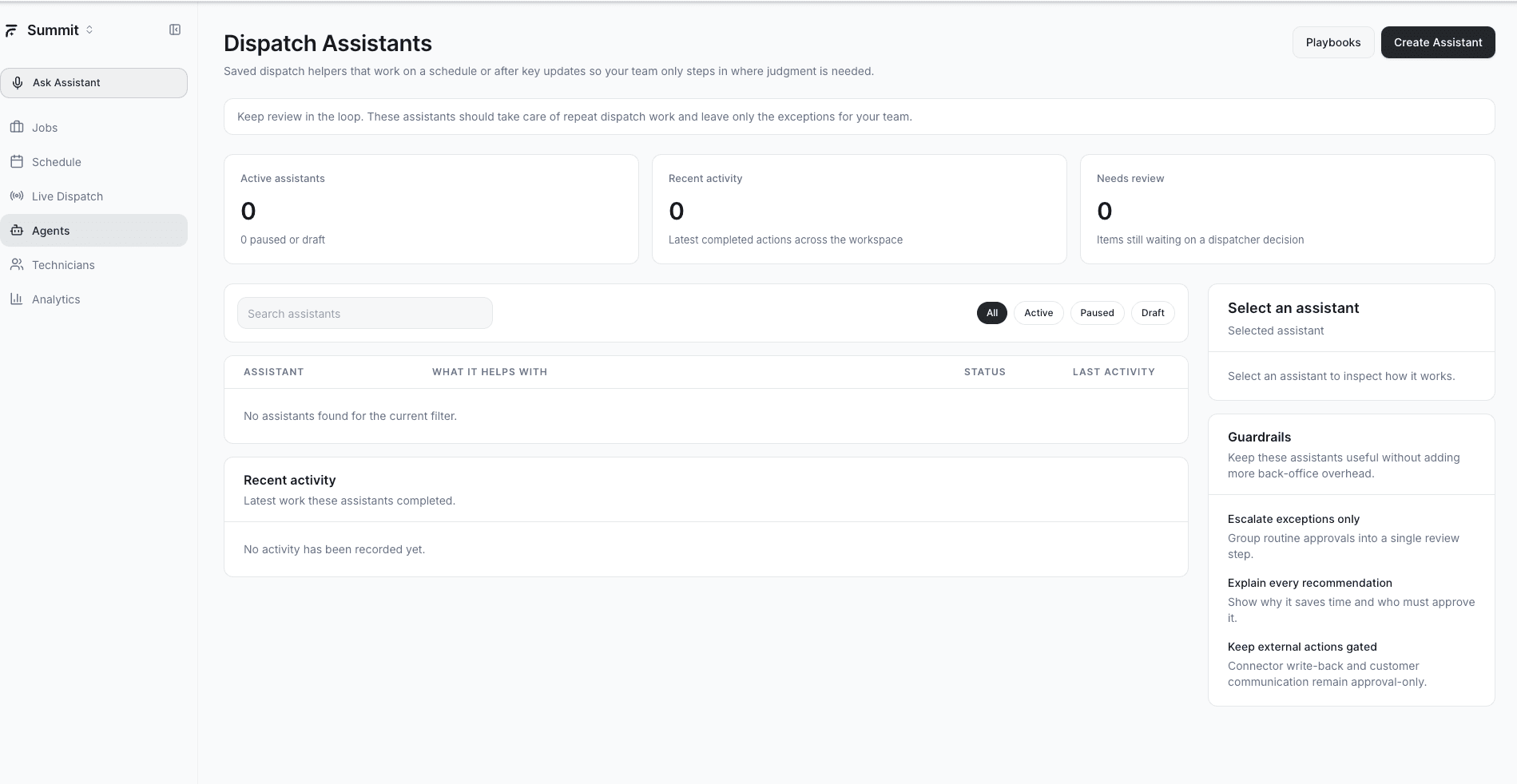
The Agents page shows:
- Active assistants count — How many assistants are currently running
- Recent activity — A feed of recent dispatch actions taken by your assistants
- Needs review — Items flagged for human attention based on your guardrails
Use the filter tabs at the top to view All, Active, Paused, or Draft assistants.
Creating an Assistant
To create a new dispatch assistant:
- Open the Agents page in AI Dispatcher
- Click Create Assistant
- Give it a name that describes its purpose (e.g., "Weekday HVAC Dispatcher" or "Emergency After-Hours")
- Choose a Playbook that defines how the assistant behaves
- Set your Guardrails to control when the assistant should pause and ask for help
- Save the assistant as Draft to test, or set it to Active to start dispatching immediately
Start with a Draft assistant and monitor its decisions for a few days before switching to Active. This lets you fine-tune the playbook and guardrails without affecting live operations.
Playbooks
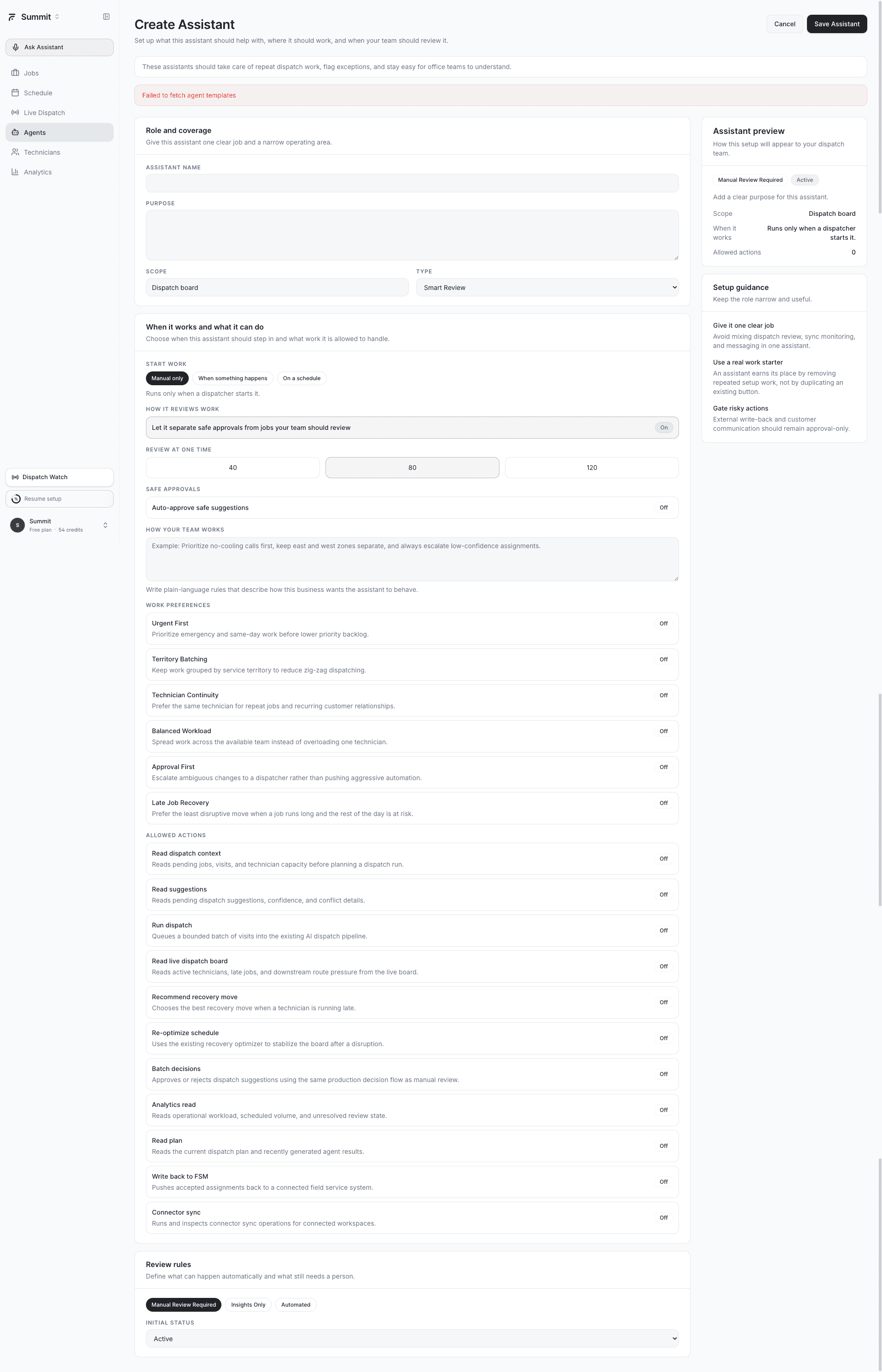
A Playbook is a predefined set of rules that tells the assistant how to make dispatch decisions. Playbooks control:
- Which jobs the assistant handles — By job type, priority, or time window
- How aggressively it dispatches — Confidence threshold for auto-assignment (e.g., only dispatch if confidence is above 80%)
- Scheduling behavior — Run on a fixed schedule (every 15 minutes, hourly) or react to new job creation and status changes
- Technician preferences — Whether to prioritize proximity, workload balance, or customer continuity
You can assign one playbook per assistant. Multiple assistants can share the same playbook or each can have a unique one.
Guardrails
Guardrails are safety controls that determine when the assistant should stop and escalate to a human. Three guardrails are available:
- Escalate exceptions only — The assistant dispatches autonomously for routine jobs but flags anything unusual (low confidence, skill gaps, schedule conflicts) for your review
- Explain every recommendation — The assistant logs detailed reasoning for every dispatch decision, giving you a full audit trail even when it acts automatically
- Keep external actions gated — The assistant can suggest and prepare assignments, but any action that touches external systems (customer notifications, calendar syncs) requires your approval first
You can enable multiple guardrails on a single assistant. For most teams, starting with Escalate exceptions only provides the best balance of speed and control.
Assistant Statuses
Each assistant has one of three statuses:
- Active — Currently running and dispatching jobs according to its playbook and guardrails
- Paused — Temporarily stopped. All configuration is preserved. Resume anytime without reconfiguring.
- Draft — Not yet live. Use this to build and refine an assistant before activating it.
You can change status at any time from the Agents page. Pausing an assistant does not undo any dispatches it already made.
Monitoring Your Assistants
The Agents page gives you two monitoring tools:
Recent Activity
A chronological feed showing every action your assistants have taken — which jobs were dispatched, which technicians were assigned, and the confidence score for each decision. Use this to spot patterns and verify the assistant is making good choices.
Needs Review
Items that triggered a guardrail escalation appear here. These are jobs the assistant could not dispatch confidently and is waiting for your input on. Review each item, then accept the suggestion, reassign manually, or dismiss it.
Keeping Humans in the Loop
Dispatch Assistants are designed around a "human-in-the-loop" philosophy. Even at their most autonomous, they:
- Never override a manual assignment you already made
- Always flag low-confidence matches for review
- Log every decision with full reasoning so you can audit at any time
- Respect your guardrails as hard boundaries, not suggestions
The goal is to handle the 80% of routine dispatches automatically so you can focus your attention on the 20% that actually need human judgment. This always-on approach is part of a broader concept called continuous planning.
Related Articles
- What is AI Dispatcher?
- Reviewing AI Suggestions
- Accepting or Rejecting AI Dispatch Suggestions
- Analytics Dashboard
- How AI Dispatcher Works Under the Hood
Further Reading
- What is Continuous Planning? — How always-on AI agents keep your schedule optimized around the clock
Which Agent Is Right for You? | AI Dispatcher
Find the right AI dispatch agent for your operation. Match your biggest scheduling pain point to the agent that solves it — from fully autonomous dispatch to end-of-day audits.
Automate Daily Dispatch | AI Dispatcher
Stop manually assigning jobs every morning. Set up the Dispatch Run or Autopilot agent to automatically match jobs to technicians on a schedule — with or without human review.