 FieldCamp
How AI voice agents work with FieldCamp | FieldCamp
See what changes when you connect FieldCamp to FieldCamp Voice: two ways calls reach your AI voice agent, mid-call tools, handoffs, and where results appear.
FieldCamp Voice runs your voice agents on its own. You can build an agent, connect a phone number and take calls without FieldCamp; see the quickstart. This page explains what changes when you also connect FieldCamp, your field service software: who does what, the two ways a call can reach your agent, and where the results show up. You don't need to be technical to follow it.
FieldCamp Voice and FieldCamp: who does what
| FieldCamp Voice | FieldCamp | |
|---|---|---|
| Role | Builds and runs your voice agents | System of record for your field service business |
| What it holds | The agent builder, the agents themselves, phone numbers from your telephony provider, calls, and outbound campaigns | Clients, jobs, requests, call flows, and the Inbox |
| Where you work in it | voice.fieldcamp.ai | Front Office AI → Voice Agents, call flows, and the Inbox |
| Needed for voice agents? | Yes | No, it's an optional connection |
The two apps are paired once, by an admin or owner, from Settings → Apps & Integrations → FieldCamp Voice in FieldCamp. After that, you can open Voice from FieldCamp with Open in Voice without signing in again. See connect FieldCamp Voice.
In FieldCamp, Front Office AI → Voice Agents has four tabs: Follow-ups, Dashboard, Reports and Agents. The Agents tab lists your published agents and shows which call flow uses each one. In that list, an agent's call flow can be marked "follows latest" or "pinned to an older version".
Two ways a call reaches your agent
| A number connected in Voice | A FieldCamp call flow | |
|---|---|---|
| Needs FieldCamp | No | Yes, with the Calls add-on |
| Where the number comes from | Your telephony provider: Twilio, Telnyx, Vonage, Plivo, Vobiz, Cloudonix or Asterisk (ARI) | A FieldCamp phone number (Twilio) |
| How the agent is chosen | The number's Inbound workflow in Voice | The AI step in your call flow |
| Who controls the call | Voice | FieldCamp; the call flow continues on the outcome |
| Where results appear | Voice Calls, the agent's Call history, and event webhooks; also the FieldCamp Inbox if FieldCamp is connected | The FieldCamp Inbox, as well as Voice |
A number connected in Voice
- A call reaches a number you connected under Phone Numbers in Voice.
- Voice hands the call to the agent set as that number's Inbound workflow.
- The voice agent talks with the caller and can use tools, such as FieldCamp or AI Dispatcher tools if you've connected them.
- When the call ends, the call appears under Calls in Voice and in the agent's Call history.
To set this up, see connect a phone number.
A FieldCamp call flow
If you use FieldCamp and its Calls add-on, your FieldCamp call flow can hand calls to a voice agent. See calls setup and usage.
- A call reaches your FieldCamp phone number.
- Your FieldCamp call flow runs its steps, such as business hours, caller lookup, a menu, or a ring group or queue.
- The flow's AI step hands the live call to the voice agent you picked, pinned to a published version. The call stays under FieldCamp's control.
- The voice agent talks with the caller and can use tools, for example to look up the customer in FieldCamp or create a job through AI Dispatcher.
- When the call ends, Voice sends the result to FieldCamp.
- The call flow continues on the outcome branch: booked, handoff, voicemail, or failed.
Tools
A tool is something the agent can do during a call rather than just talk about, such as looking a customer up, booking the job, transferring to a person, or hanging up. You manage tools on the Tools page in Voice, which has two tabs: MCP servers and Built-in tools.
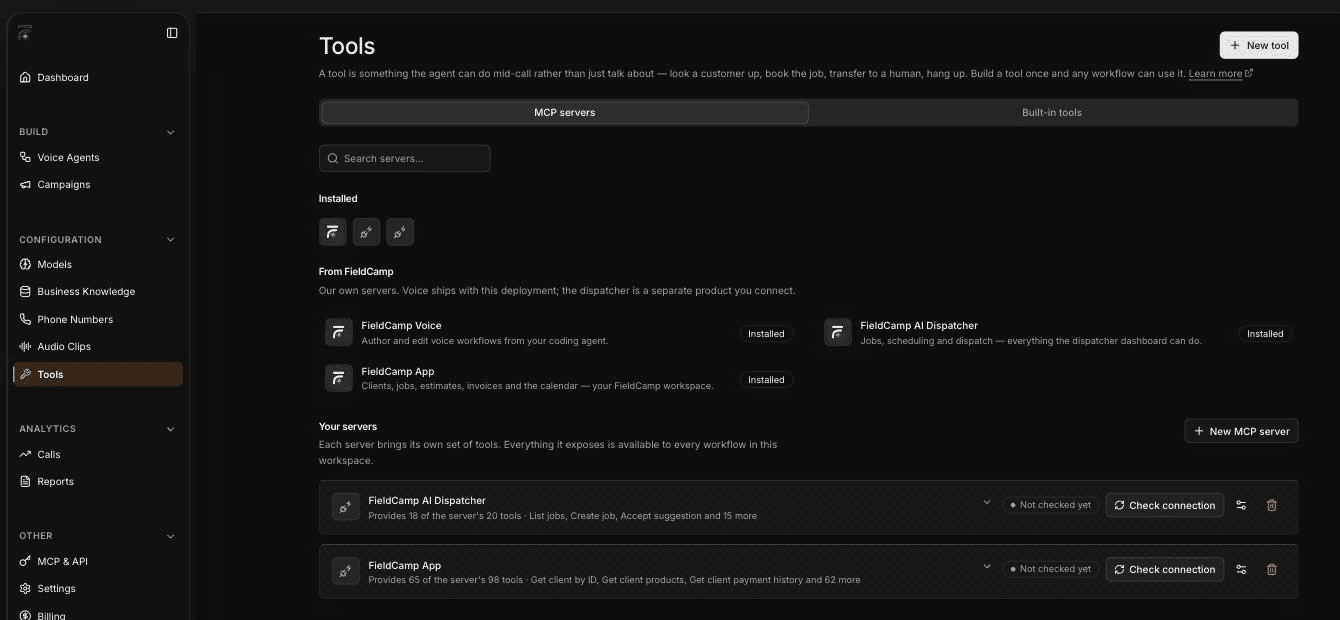
Under From FieldCamp, Voice lists three servers:
- FieldCamp App: "Clients, jobs, estimates, invoices and the calendar — your FieldCamp workspace." This needs the FieldCamp connection. A voice agent can use it to look up clients, jobs, estimates, invoices and the calendar, and to create a request.
- FieldCamp AI Dispatcher: "Jobs, scheduling and dispatch — everything the dispatcher dashboard can do." A voice agent can use it to list jobs, create a job, and accept or reject a dispatch suggestion. This needs an AI Dispatcher connection, which works with or without FieldCamp; see AI Dispatcher connectors and integrations in the AI Dispatcher docs.
- FieldCamp Voice: "Author and edit voice workflows from your coding agent."
Under Your servers, each row has a Check connection button so you can confirm the server is reachable. You can add your own with New MCP server or New tool; see connect a custom MCP server.
Handoffs to your team
A voice agent doesn't have to finish every call on its own. There are three ways a call gets back to a person:
- Transfer to a person during the call. A voice agent can transfer the caller to your team. Warm transfer works with Twilio only. Call transfer can't be tried in the browser Test Audio panel, because some telephony-only tools aren't supported there yet.
- Route on the call flow's outcome. If the call came through a FieldCamp call flow, the flow continues on the handoff or failed branch, as well as booked and voicemail. Route a failed handoff to a person, using your own rules for who answers.
- Call back requested. With FieldCamp connected, when the result is "call back requested", the customer's thread goes back into your team's queue as waiting.
Where call results appear
Every call appears in Voice, whichever way it arrived: on the Calls page and in the agent's Call history, with the Dashboard and Reports showing calls per day, call length and how calls ended. To send call events to your own systems, turn on Event webhooks in the agent's Settings. To find recordings in Voice, see call limits and recordings.
If you've connected FieldCamp, Voice also sends the result to FieldCamp. It lands in the Inbox on the customer's thread with one of these outcomes:
- Voice agent · booked
- call back requested
- no answer
- not interested
Each result includes the call recording and a link to the transcript. If the call was part of a campaign, the campaign is stamped on the job. In FieldCamp, the Follow-ups tab under Front Office AI → Voice Agents lists calls that leave someone to ring back.
Outbound calls and campaigns
Voice agents can place calls too. A campaign in Voice calls a list of contacts with the voice agent you choose. You can upload the list as a CSV file in Voice. If you've connected FieldCamp, it can also enroll contacts from segments and workflows. To set what an outbound agent does when it reaches voicemail or a phone menu, see detect voicemail and phone menus.
With FieldCamp connected, FieldCamp passes its opt-outs to Voice, so Voice won't dial someone who has opted out in FieldCamp.
Frequently asked questions
What is an AI voice agent and how does it work?
A voice agent is an AI that holds a phone conversation by following the steps you build in FieldCamp Voice. It answers calls on a number you connect in Voice or, if you use FieldCamp, calls handed over by a FieldCamp call flow. It can use tools during the call, and every call appears in Voice.
Do I need FieldCamp for my voice agent to answer calls?
No. Connect a number from your telephony provider in Voice and set the agent as its Inbound workflow. Connecting FieldCamp is optional and adds customer lookups, call flows and Inbox results.
How does an AI answering service work with FieldCamp?
A call to your FieldCamp number runs through your call flow, and the flow's AI step passes the call to your voice agent. The call stays under FieldCamp's control, and the flow continues on the outcome: booked, handoff, voicemail, or failed.
What happens when a voice agent can't answer a question?
That depends on the conversation you build. You can have the agent transfer the caller to your team. If the call came through a FieldCamp call flow, the flow can also route the handoff and failed outcomes to a person.
Can an AI receptionist transfer calls to a person?
Yes. A voice agent can transfer a caller to your team during the call. Warm transfer works with Twilio only.
Where do call results show up in FieldCamp?
On the customer's thread in the FieldCamp Inbox, labeled with the outcome, such as "Voice agent · booked" or "call back requested", with the recording and a transcript link. A "call back requested" result puts the thread back in your team's queue as waiting.
Related articles
Quickstart: answer your first call with AI | FieldCamp
Build your first AI voice agent in FieldCamp Voice: start from a template, test it, publish it, and connect a phone number. FieldCamp is optional.
Connect FieldCamp and FieldCamp Voice | FieldCamp
If you use FieldCamp, connect it to FieldCamp Voice so voice agents can use your customer data, answer in call flows, and send results to the Inbox.