 FieldCamp
Use the Global step and global routing | FieldCamp
Give every step the same persona with the Global step, and add global routes so callers can jump to emergencies or go back from anywhere in the call.
Two features apply to the whole call rather than to one step:
- The Global step holds the persona, tone and company rules that every step shares.
- Global routing lets a caller reach a step from anywhere in the call, without a connection on the canvas, and then return to where they were.
This page explains both, then puts them together in an emergency example.
What the Global step does
In the Add a step panel, the Global step is listed as Global Node. It holds the persona and tone that are added to each step's prompt. A few rules apply:
- An agent can have only one Global step.
- It has no connections. It isn't a place in the call that the agent moves to; it's text that's added to the other steps' prompts.
- Its Name is "Short identifier shown in the canvas and call logs. Has no runtime effect."
- Its Global Prompt is added to the prompt of every step that has Add Global Prompt turned on. Start Call, Agent and End Call steps have this switch in Additional settings, and it's on by default.
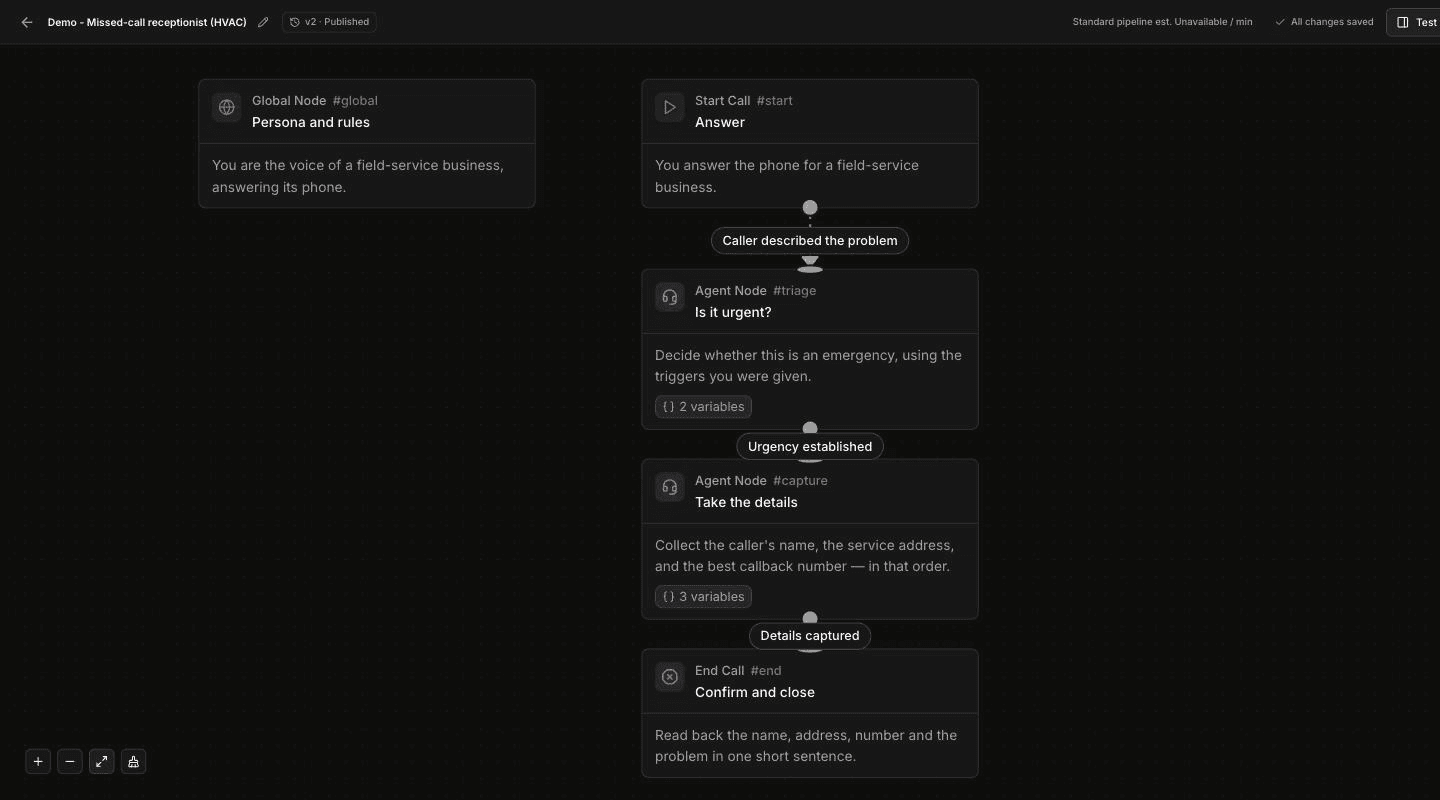
In the Missed-call receptionist template, the Global step is named "Persona and rules" and sits on its own, next to the Start Call step.
Write the shared persona
Double-click the Global step, or select it and click the pencil icon, to open Edit Global Node. Write the Global Prompt (required). It supports {{variables}}, for example {{company_name}}.
Put things here that should be true in every step:
- Who the agent is and how it sounds. For example: "You are the voice of a field service business, answering its phone. Warm first, efficient second. Short sentences, one question at a time."
- What it must not say. For example, never state a price, arrival time or technician name unless a tool result gave it.
- Your emergency triggers, if you have them, so every step recognizes them.
Keep step-specific instructions, such as "collect the service address", in the Agent step that does that job.
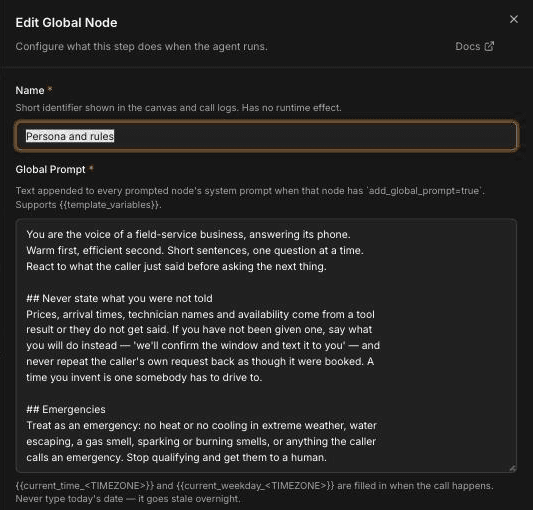
The Missed-call receptionist template's Global Prompt includes an "## Emergencies" section with example triggers, such as no heat or no cooling in extreme weather, escaping water, a gas smell, or sparking or burning smells. These are examples only. Replace them with your own company's emergency rules before the agent takes real calls.
Add a global route
A global route lets the agent jump to a step from any point in the call when a condition is met. You set it up on the destination step itself, which can be an Agent step or an End Call step. The step doesn't need an incoming connection on the canvas.
Add the destination step
Click +, then add an Agent Node (or End Call). Name it for what it does, such as "Emergency handoff".
Write its prompt and attach its tools
Write the step's Prompt, and in Tools, select only what this step needs, such as a transfer tool. Only the tools a step has selected are available to that step.
Enter the Global Transition Condition
In Global Transition Condition, describe when the call should come here: "When this condition matches, enter this step from anywhere in the call without a canvas edge. Leave blank to disable."
Add example transcripts
In Additional settings, add Positive Example Transcripts (conversations that should trigger the route) and Negative Example Transcripts (conversations that look similar but shouldn't).
Set a cooldown
Set Cooldown Steps: "After leaving this global step, block re-entry for this many subsequent node transitions. Caller turns do not count. Zero allows immediate re-entry."
Save and test
Click Save, then Save changes in the header, and test the agent before you publish.
Write a clear condition
The condition is judged from the conversation, so write it the way you'd brief a person: "The caller describes a situation that matches one of our emergency rules." Avoid conditions that overlap with a normal connection from the same step, so the agent isn't choosing between two routes that mean the same thing.
Use positive and negative examples
Examples help the agent tell a real trigger from a near miss. Negative examples matter as much as positive ones. A caller who mentions a past problem, or asks about a service by name, shouldn't set off an emergency route.
Stop a route from triggering too often
Cooldown Steps blocks the route for a number of step changes after the caller leaves it. Only moves between steps count, not caller turns. With a cooldown of 3, a caller who says "no, it's not urgent" and returns to the call won't be pulled back to the emergency step until the call has moved through three more steps. A cooldown of 0 allows the route to fire again right away.
If the builder shows "Transition label conflicts with a reserved global routing tool name.", rename the connection label mentioned in the error. Connection labels also name the agent's transition tools, so they can't reuse the names Voice keeps for global routes.
Return to the previous step
Go Back Conditions tell the agent when to leave the global step and go back: "When resolved, return to the interrupted step without repeating its opening."
For example, if a caller asks about your service area in the middle of booking, a global "Service area question" step can answer from the business knowledge you attach to it, then return to the booking step without starting it over. A Go Back Condition such as "The caller's question about service areas has been answered" makes that happen.
On an End Call step, Go Back Conditions work a little differently: the step "waits for an explicit finish or return decision before hanging up." That stops the agent from hanging up on a caller who still has something to add.
Example: gas-leak or no-heat emergency
This example uses one heating company's rules. Replace the triggers, the wording and the transfer destination with your own.
Global Prompt (in the Global step):
## Emergencies
Treat these as emergencies: a gas smell, no heat when the outside
temperature is below freezing, or carbon monoxide alarm sounding.
When a caller describes one, stop qualifying and get them to a person.
Emergency handoff (an Agent step with a transfer tool selected):
| Field | Example value |
|---|---|
| Prompt | "Tell the caller you're connecting them to the on-call technician now. Read your company's safety wording, word for word." |
| Global Transition Condition | "The caller describes a situation that matches one of our emergency rules." |
| Go Back Conditions | "The caller says it isn't an emergency after all." |
| Positive Example Transcripts | Caller: "There's a gas smell by the furnace." / Caller: "The heat's been out since last night and it's 10 degrees." |
| Negative Example Transcripts | Caller: "We had a gas smell last year, that got fixed. I just want a tune-up." / Caller: "The heat works but it's a bit noisy." |
| Cooldown Steps | 3 |
Add a connection out of the step with the path trigger Transfer failed, leading to a step that takes the caller's number for an urgent callback. Warm transfer works only with Twilio, and a browser Test Audio session doesn't place real transfers, so test the transfer on a real phone call. See Transfer a call to a person and Set up transitions and conditions.
Frequently asked questions
How do I route an emergency call from any point in the conversation?
Add an Agent step for the emergency, select a transfer tool on it, and fill in its Global Transition Condition. The agent can then enter that step from anywhere in the call, with no connection on the canvas. The emergency rules are yours; write them in the Global Prompt and the condition.
What belongs in the Global step vs a regular step?
The Global step holds what's true for the whole call: persona, tone, what the agent must never promise, and your company rules. A regular step holds the instructions for one job, such as collecting the service address.
Can the caller go back to the previous topic?
Yes. Add Go Back Conditions to the global step. When a condition is met, the agent returns to the step the caller was in without repeating its opening.
How do I stop a global route from triggering too often?
Set Cooldown Steps to block the route for a number of step changes after the caller leaves it, and add Negative Example Transcripts for conversations that look similar but shouldn't trigger it.
Can I connect other steps to the Global step?
No. The Global step has no connections and isn't a destination. To create a step that callers can reach from anywhere, add a Global Transition Condition to an Agent step or End Call step instead.
Related articles
Configure an Agent step in your voice agent | FieldCamp
Configure an Agent step: write its prompt, override the model, voice, or interruption settings, attach tools and knowledge, and extract caller details.
Branch a call with the Logic Split step | FieldCamp
Route calls with the Logic Split step: rule-based branches that check caller details such as urgency, service type or ZIP code, with one required Else path.