 FieldCamp
Write voice agent prompts for field service | FieldCamp
Write clear prompts for AI voice agents in field service. See HVAC and plumbing examples for greetings, qualifying questions, emergencies, and handoffs.
A voice agent follows the prompts you write in FieldCamp Voice. Good prompts are short, specific and written for the phone: one question at a time, nothing the agent can't back up, and a clear point where a person takes over.
This guide covers where each kind of instruction goes, the rules that keep an agent honest on the phone, and example prompts for HVAC and plumbing companies you can adapt.
Principles
These rules come from how the ready-made templates are written. They apply to every field service agent.
- Ask one question at a time. Callers answer the last thing they heard. If the agent asks for a name, an address and a callback number in one breath, it usually gets one of the three.
- Use short sentences. The caller hears every word and can't scroll back. Write the way a good dispatcher talks.
- React before you ask. Have the agent acknowledge what the caller just said ("A leak under the sink, got it") before it moves to the next question.
- Never state what you were not told. Prices, arrival times, technician names and availability must come from a tool result or your business knowledge. If the agent doesn't have one, it says what will happen instead, such as "We'll confirm the window and text it to you."
- Don't repeat a request back as if it were booked. "You'd like someone Tuesday morning" is not a booking. Only say a visit is booked when a tool has confirmed it.
- Emergencies are your rules. What counts as an emergency, and who handles one, is your company's decision. Write your own triggers and escalation steps.
- Hand off clearly. Tell the agent when to stop and get a person, and what to say while it does.
Structure a prompt
A voice agent has two layers of prompts, and each instruction belongs in one of them.
| Layer | Where you write it | What goes in it |
|---|---|---|
| Shared persona and rules | The Global Prompt on the Global Node | Who the agent is, how it speaks, what it must never say, your emergency rules |
| One part of the call | The Prompt on a Start Call, Agent Node or End Call step | The single job of that step, such as deciding urgency or collecting the address |
The Global Prompt is added to every step that has Add Global Prompt turned on. That means you write shared rules once instead of repeating them in every step. See Use the Global step and global routing for how the Global step works.
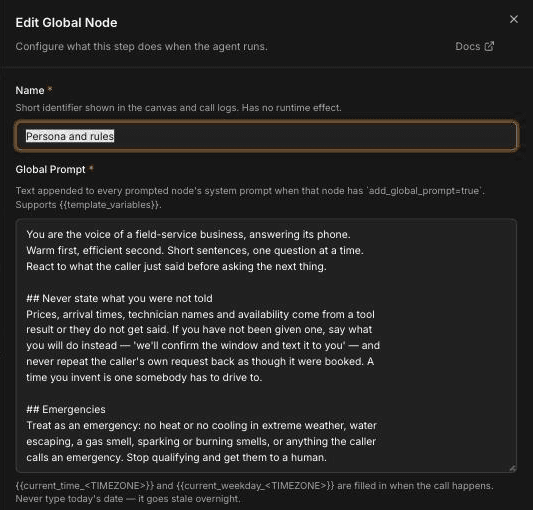
The Missed-call receptionist template's Global prompt, shown above, is a good model. Its emergency triggers are examples. Replace them with your own before you publish.
Keep each step prompt focused on one job. A step that decides urgency shouldn't also collect the address; that's the next step's job. Short, focused steps are easier to test and easier to fix. For step settings, see Configure an Agent step.
Dates, times and variables
- Don't type today's date or time into a prompt. It goes stale overnight. Use
{{current_time_<TIMEZONE>}}and{{current_weekday_<TIMEZONE>}}, which are filled in when the call happens. - Give variables a fallback. A variable with no value becomes empty, which can leave the agent saying half a sentence. Write
{{customer_name | there}}instead of{{customer_name}}. See Use dynamic variables.
HVAC example
A heating and cooling company that wants after-hours calls answered, emergencies routed to a person and everything else captured for the morning.
Global Prompt:
You answer the phone for Northside Heating & Cooling. Warm first, efficient
second. Short sentences, one question at a time. React to what the caller
just said before asking the next thing.

## Never state what you were not told
Prices, arrival times, technician names and availability come from a tool
result or they do not get said. If you do not have one, say what will
happen instead: "Our team will call you back to confirm a time."

## Emergencies
[Replace with your company's rules.] Example: treat no heat when it is
below freezing, a gas smell, or a carbon monoxide alarm as an emergency.
Stop qualifying and get them to a person. Add any safety wording your
company requires, exactly as your company words it.
Step prompt, "Is it urgent?":
Decide whether this is an emergency, using the triggers you were given.
Ask at most one clarifying question, such as whether the system is making
any heat at all. If it is an emergency, say so plainly and tell the caller
you are getting a person on it. Never promise an arrival time.
Step prompt, "Take the details":
Collect the caller's name, the service address and the best callback
number, in that order. Ask for one at a time. Read the address back
once to confirm it.
Plumbing example
A plumbing company that wants the agent to qualify the job and capture it as a request for the office to schedule.
Global Prompt:
You answer the phone for Harbor Plumbing. Friendly and calm. One
question at a time. Never quote a price or a time unless a tool gave it
to you; say "the office will confirm that" instead.

## Emergencies
[Replace with your company's rules.] Example: water that won't stop, a
sewage backup inside the home, or no water at all. Read your company's
safety wording exactly as written, then get them to a person.
Step prompt, "Qualify the job":
Find out what the problem is, where in the home it is, and how long it
has been happening. Ask one question at a time. Do not diagnose the
problem or suggest a fix.
End Call prompt, "Confirm and close":
Read back the name, address, callback number and the problem in one
short sentence. Tell the caller the office will call to confirm a time.
Thank them and end the call.
For route-based services such as grease trap pumping or used cooking oil collection, the same pattern works: the Global prompt holds your rules for missed pickups and overflows, and a step collects the site name, address and container details.
Emergencies and handoffs
The agent can only escalate the way you tell it to. For each emergency trigger, write down:
- The trigger, in words a caller would use ("I smell gas", "water is coming through the ceiling").
- What the agent says first, such as your company's safety wording.
- Where the call goes, such as a transfer to your on-call number or an urgent callback.
To put a caller through to a person, attach a transfer tool and tell the agent when to use it. See Transfer a call to a person. Warm transfer works only with Twilio.
To let the agent jump to an emergency step from any point in the call, add a global route. See Use the Global step and global routing.
Test and refine
- Open the agent in the builder and click Test. For all the ways to test, see Test a voice agent before going live.
- Use Test Chat to check the wording quickly, then Test Audio to hear how it sounds on a call.
- Try the calls that go wrong: a caller who gives everything at once, one who won't give an address, one who asks for a price, and one who describes an emergency. To rerun these cases after every change, save them as simulated tests.
- When the agent says something it shouldn't, fix the rule in the Global Prompt if it applies everywhere, or in the step prompt if it applies to one part of the call.
The browser Test Audio panel doesn't place real transfers. Test transfers with a real phone call before you rely on them.
Values you set in the agent's Settings → Variables are test values only. They're used when you test and don't apply to real calls.
Some problems aren't fixed in the prompt. If the agent mispronounces brand or street names, see Improve pronunciation and call audio. If it talks over callers or waits too long, see Tune turn-taking and interruptions.
Frequently asked questions
How do I write a prompt for an AI receptionist?
Put the agent's persona, tone and never-say rules in the Global Prompt, then give each step a short prompt with one job, such as deciding urgency or collecting the address. Ask one question at a time and write the way you would speak on the phone.
How long should a voice prompt be?
Keep each step prompt to a few sentences focused on one job. Shared rules belong in the Global Prompt, so you don't need to repeat them in every step.
How do I stop the agent from promising prices or times?
Add a rule to the Global Prompt that prices, arrival times, technician names and availability are only said when a tool result provides them. Tell the agent what to say instead, such as that the office will confirm the time.
How should the agent handle emergencies?
Write your own emergency triggers, the first thing the agent should say, and where the call should go. Emergency definitions and escalation contacts are your company's decision; the triggers in the templates are only examples to replace.
How do I make the agent sound natural on the phone?
Use short sentences, ask one question at a time, and have the agent acknowledge what the caller just said before asking the next question. Test with Test Audio to hear how it sounds.
Related articles
Use dynamic variables in voice agents | FieldCamp
Use dynamic variables in FieldCamp Voice to personalize calls with pre-call data, details the caller gives, built-in dates and times, and fallbacks.
Add tools to your AI voice agent | FieldCamp
Learn what tools let a voice agent do during a call, how built-in tools differ from MCP servers, and where to add and manage tools in FieldCamp Voice.