 FieldCamp
AI Receptionist for field service businesses | FieldCamp
Build AI voice agents that answer and make calls for HVAC, plumbing and electrical teams. Works on its own; connecting FieldCamp or AI Dispatcher is optional.
AI Receptionist lets you build voice agents that answer and make phone calls for your business. You build and run them in FieldCamp Voice (voice.fieldcamp.ai), which works on its own: create an account, build an agent, connect a phone number and start taking calls. You don't need a FieldCamp account.
If you use FieldCamp field service software or AI Dispatcher, you can connect them to Voice. Both connections are optional. A voice agent can qualify the caller, capture their details and, with FieldCamp or AI Dispatcher connected, look up the customer or book the job.
What AI Receptionist does
- Answers inbound calls. Connect a number from your own telephony provider in Voice and choose the agent that answers it. See connect a phone number. If you use FieldCamp, a FieldCamp call flow can also hand calls to a voice agent.
- Places outbound calls. Voice campaigns call a list of contacts with the voice agent you choose.
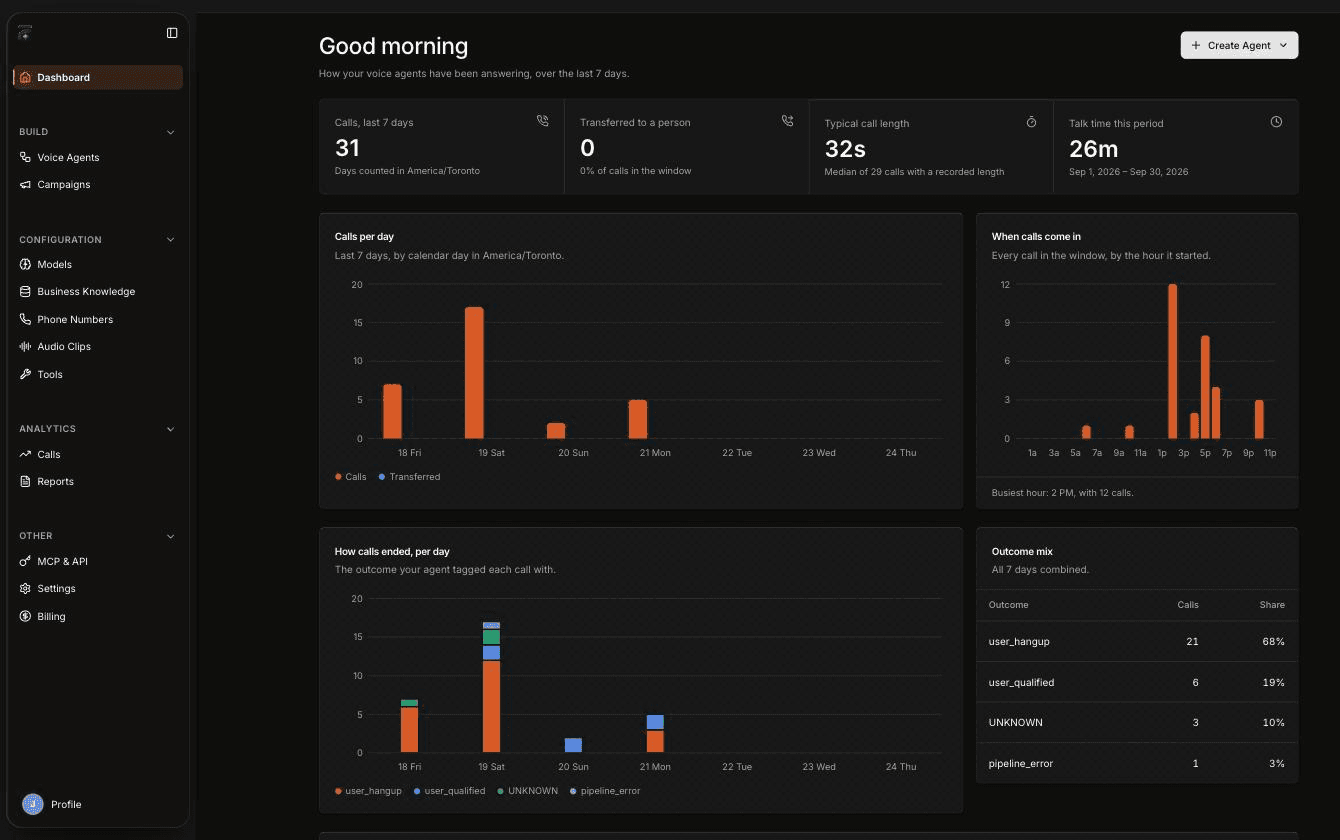
- Keeps a record of every call. Voice lists calls on its Calls page and in each agent's Call history, and the Dashboard and Reports show how your agents are answering. Event webhooks can send call events to your own systems.
- Works with your other tools, if you connect them. With FieldCamp connected, an agent can look up clients, jobs, estimates, invoices and the calendar, create a request, and send results to the FieldCamp Inbox. With AI Dispatcher connected, it can create a job and book the technician AI Dispatcher suggests. You can also connect your own systems with custom MCP servers and custom HTTP API tools.
What you can do
Create an agent from a template, test it, publish it, and connect a phone number.
Describe what the agent should do, or start from a blank canvas.
Pick one of six working inbound agents and fill in your business.
Find your way around agents, numbers, knowledge, calls, and reports.
If you use FieldCamp, pair it with Voice to use your customer data and send results to the Inbox.
Follow a call from your number to the agent and on to FieldCamp.
Who it is for
AI Receptionist is for owners, operations leaders and contact-center managers at field service businesses, for example:
- HVAC, plumbing and electrical companies that want a voice agent to answer when the team can't, decide whether a call is urgent using your rules, and take the details.
- Route-based services such as grease trap and used cooking oil collection, where a voice agent can recognize an existing customer or capture a service request for your team.
Voice agents and AI CSR: how they differ
Voice agents are different from AI CSR, which is part of FieldCamp. If you use FieldCamp, you'll see both under Front Office AI, on the Voice Agents and AI CSR tabs.
| Voice agents | AI CSR | |
|---|---|---|
| Channel | Phone calls | Chat, SMS and email |
| Where you build it | FieldCamp Voice | FieldCamp |
| Needs a FieldCamp account | No; connecting FieldCamp is optional | Yes, it's part of FieldCamp |
| Where it appears in FieldCamp | Front Office AI → Voice Agents, once FieldCamp is connected | Front Office AI → AI CSR |
| How it goes live | Set it as the inbound agent on a number in Voice, run a Voice campaign, or pin it into a FieldCamp call flow | See set up AI CSR |
This section of the docs covers voice agents only.
What you need before you start
- A FieldCamp Voice account. Go to voice.fieldcamp.ai and click Create an account, or Sign in if you already have one. FieldCamp users can sign in with their FieldCamp login.
- A telephony provider, for real calls. You can build and test an agent in your browser without one. To answer or make real calls, connect a provider such as Twilio, Telnyx, Vonage, Plivo, Vobiz, Cloudonix or Asterisk in Voice under Phone Numbers. Voice can't buy phone numbers.
- Optional: FieldCamp. If you use FieldCamp, an owner or admin can connect FieldCamp so agents can use your customer data and answer calls on your FieldCamp number through a call flow. See calls setup and usage.
- Optional: AI Dispatcher. Connect AI Dispatcher if you want the agent to book jobs with the technician it suggests, as the Book the job template does. It works with or without FieldCamp. See book jobs with AI Dispatcher during a call.
Frequently asked questions
What is an AI receptionist?
AI Receptionist is a set of voice agents that answer and make phone calls for your business. You build them in FieldCamp Voice and put them on your own phone numbers or in Voice campaigns. If you use FieldCamp, you can also use them in FieldCamp call flows.
Do I need FieldCamp to use voice agents?
No. FieldCamp Voice works on its own: create an account, build an agent, connect a telephony provider and take calls. Connecting FieldCamp or AI Dispatcher is optional and adds customer lookups, job booking and Inbox results.
What is an AI voice agent?
A voice agent is an AI that holds a phone conversation by following the steps you build in FieldCamp Voice. It can use tools mid-call, such as looking up a customer or transferring the call to a person.
How does an AI receptionist work?
A call reaches a number you've connected in Voice, and Voice hands it to the agent set as that number's inbound agent. The agent follows your conversation, can use tools, and the call's recording and outcome appear under Calls in Voice. If you've connected FieldCamp, a FieldCamp call flow can hand calls to the agent instead, and results also land in your FieldCamp Inbox.
Is an AI receptionist the same as an answering service?
Not quite. A voice agent follows the conversation you design, can use tools during the call, and records the outcome, recording and transcript of every call. You decide what happens next, including transferring the call to your team.
How does a voice agent qualify leads?
It asks the questions you give it, in the order you set. For example, the Missed-call receptionist template decides whether a call is an emergency using the triggers you provide, then collects the caller's name, service address and best callback number.