 FieldCamp
Let your voice agent end the call | FieldCamp
Add the End call tool so your voice agent can hang up at the right moment, such as after it confirms a booking or when a caller says goodbye.
The End call tool lets your voice agent hang up by itself when the conversation is finished. It can say a goodbye first, and it can note why the call ended.
You create the tool once on the Tools page in FieldCamp Voice, then attach it to the steps where hanging up makes sense. Only the tools a step has selected are available to that step. For how tools work, see Add tools to your AI voice agent.
When to use it
Use the End call tool when a call can finish in the middle of a step, not only at the end of your flow. For example:
- A caller says "That's all, thanks" after the agent answers a question about your service area.
- A plumbing customer calls to confirm tomorrow's visit, hears the answer, and says goodbye.
- The caller has dialed the wrong number, or the call is clearly spam.
If every call in your flow ends in the same place, with a closing exchange such as reading back the details, use an End Call step instead. See Tool vs step.
Create it
Open Tools
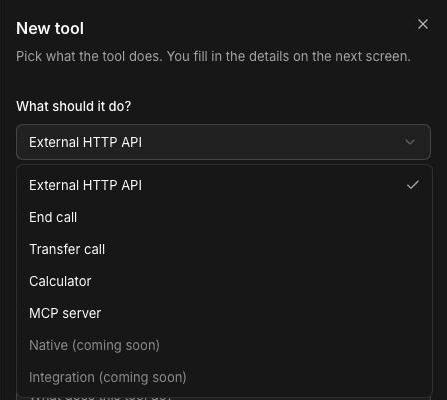
In Voice, click Tools in the sidebar, then click New tool.
Choose End call
Under What should it do?, choose End call. Voice fills in a starting Name and Description: "End the call when either user asks to disconnect the call, or when you believe its time to end the conversation". You can change both.
Create the tool
Click Create tool. The tool's page opens.
Set how the call ends
Fill in the settings below, then save.
The tool's page has these settings:
- Name: "Only you and your team see this."
- Description: tells the agent when to hang up. The agent decides from what you write here, so this is the most important field.
- Record why the call ended: off by default. Turn it on and the agent gives a reason when it hangs up. The reason becomes the call's outcome and a tag you can filter reports by. When it's on, Reason description tells the agent what kind of reason to give, for example "One of: booked, question answered, wrong number, spam."
- Goodbye message: No message hangs up straight away. Custom message says a line of your own, such as "Thank you for calling. Goodbye!". Pre-recorded audio plays a clip from Audio clips.
Tell the agent when to hang up
An agent that hangs up too early loses the caller. Write the Description so the agent waits for a clear end:
- "End the call only after the caller confirms they have nothing else to ask."
- "Before ending, confirm the service address and callback number if you collected them."
- "Don't end the call while the caller is describing a problem, even if they pause."
Then attach the tool to the steps that may end the call. Open the step, go to Tools, select the End call tool on the HTTP & Tools tab, and save. Leave it off steps where hanging up would be a mistake, such as the step that collects an emergency caller's address.
Spam and wrong numbers
You can let the agent end spam or wrong-number calls, but keep the rule narrow. A real customer who opens with "Is this the heating place?" isn't a wrong number. For example: "If the caller says they dialed the wrong number, apologize and end the call. If a recorded sales message plays and nobody responds to a question, end the call." Turn on Record why the call ended so you can review these calls later and check the agent isn't hanging up on customers.
Tool vs step
| End call tool | End Call step | |
|---|---|---|
| Where it lives | On the Tools page. You attach it to steps. | On the builder canvas, as the last step of a path. |
| When the call ends | Whenever the agent decides the call is over, during any step that has the tool. | When the call reaches that step and the closing exchange is done. |
| What it says | An optional goodbye line or clip. | A full closing conversation from its prompt, such as reading back the details. |
| Best for | Calls that can finish early or unexpectedly. | The planned end of the call. |
Many agents use both. The End Call step closes the normal path, and the tool covers callers who are done sooner. See End a call with the End Call step.
Frequently asked questions
What's the difference between the End call tool and the End Call step?
The End Call step is a place on the canvas where the call finishes after a closing exchange. The End call tool lets the agent hang up from any step it's attached to, whenever it decides the conversation is over.
How do I stop the agent from hanging up too early?
Write a specific Description that says what must happen before the call ends, such as the caller confirming they have nothing else to ask. Attach the tool only to steps where ending the call makes sense.
Should the agent end spam or wrong-number calls?
It can, if you tell it exactly when. Keep the rule narrow so real customers aren't cut off, and turn on Record why the call ended so you can review those calls.
Can the agent say goodbye before hanging up?
Yes. Set Goodbye message to Custom message and type the line, or choose Pre-recorded audio to play a clip. Choose No message to hang up straight away.
Can I see why a call ended?
Yes, if Record why the call ended is on. The reason the agent gives becomes the call's outcome and a tag you can filter reports by.
Related articles
Transfer a call to a person (warm or cold) | FieldCamp
Set up warm and cold call transfers so your voice agent can hand callers to a person, pass context to your team, and handle transfers that fail.
Call an external API during a call | FieldCamp
Create a custom HTTP tool so your voice agent can call any API during a call, send caller details, and use the response in the conversation.