 FieldCamp
Tune turn-taking and interruptions | FieldCamp
Control how long your voice agent waits before replying, how easily callers can interrupt, backchannel acknowledgments, idle reminders, and silence hang-ups.
Turn-taking settings decide when your voice agent starts talking, when it stops because the caller cut in, and what it does when the line goes quiet. Getting them right is the difference between an agent that talks over a homeowner describing a leak and one that waits politely while they find their account number.
You set them once per agent, and individual steps can override them. Most of this page applies to calls that use the Model and voice option on the Models page. Speech-to-speech (realtime) models keep most of their own turn-taking controls, except where noted below. See Choose models and voices.
Where to find the settings
- On the Voice agents page, open the agent's row menu and choose Settings, or click the gear button on the builder canvas.
- Open General. Turn-taking is in the Turn-taking controls, Turn detection and Interruption blocks.
- Change what you need, then click Save changes. Each block saves on its own.
The page states the rule for empty fields: "Blank fields preserve current behavior." Leave a field blank unless you have a reason to change it.
Choose a preset
Two presets fill in several fields at once. Start with one, test it, then adjust single fields.
| Preset | What it sets | Good for |
|---|---|---|
| Natural conversation (marked Recommended) | "Semantic turn completion with a 0.6-second fallback, responsive interruptions, acknowledgments, and one reminder after 10 seconds." | Most inbound service calls, where callers describe a problem in their own words |
| Responsive speech-timeout profile | "400 ms pause floor, adaptive pacing, high interruption sensitivity, natural acknowledgments, and one reminder after 10 seconds." | Short, quick exchanges when you want the transcription-based detector |
Click Apply natural conversation or Apply responsive profile, then click Save changes.
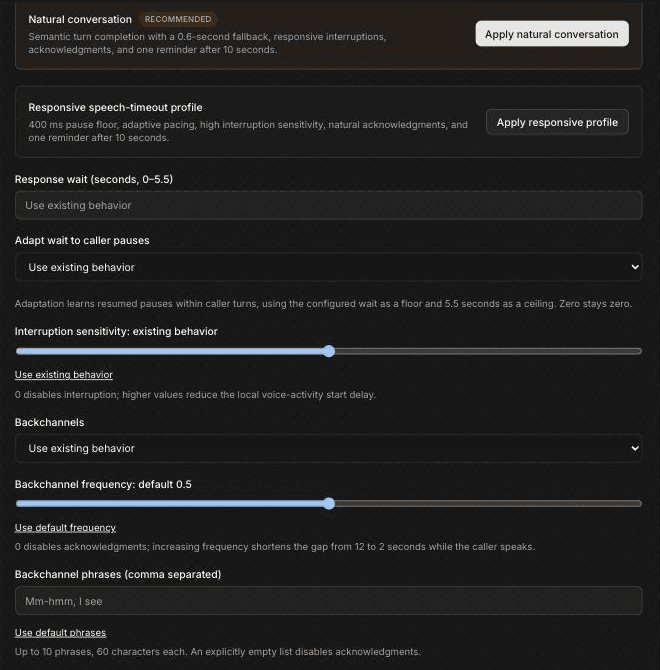
Response wait
Response wait (seconds, 0–5.5) is how long the agent waits after the caller stops speaking before it replies. A short wait feels snappy. A longer wait gives callers room to pause mid-sentence, for example while reading out a service address or a work-order number.
Adapt wait to caller pauses can be Use existing behavior, On or Off. When it's on, "Adaptation learns resumed pauses within caller turns, using the configured wait as a floor and 5.5 seconds as a ceiling. Zero stays zero." In practice, if a caller keeps pausing and then carrying on, the agent learns to wait a little longer for that caller.
The page notes: "Response wait and adaptation use transcription-based turn detection." If you choose Smart turn analyzer as the Detection strategy, these two fields are cleared and turned off.
Interruption sensitivity
The Interruption sensitivity slider runs from 0 to 1. "0 disables interruption; higher values reduce the local voice-activity start delay." A higher value lets the caller stop the agent sooner. A lower value makes the agent more likely to finish its sentence. Click Use existing behavior under the slider to clear your value.
Turning interruption off for the whole agent is rarely a good idea. Callers who can't cut in to say "no, the other address" get frustrated. If one part of the call must be heard in full, turn interruption off for that step only (see Step-level overrides).
Backchannel acknowledgments
Backchannels are the short "Mm-hmm" and "I see" sounds the agent makes while the caller is talking, so they know it's still listening. They help most when a caller explains a problem at length, such as a furnace that short-cycles or a breaker that keeps tripping.
- Backchannels: Use existing behavior, On or Off.
- Backchannel frequency (default 0.5): "0 disables acknowledgments; increasing frequency shortens the gap from 12 to 2 seconds while the caller speaks."
- Backchannel phrases (comma separated): for example "Mm-hmm, I see, Okay". "Up to 10 phrases, 60 characters each. An explicitly empty list disables acknowledgments." Click Use default phrases to go back to the defaults.
Keep the phrases short and neutral. A phrase like "Got it" can sound like agreement to something the caller hasn't finished saying.
Idle reminders and end after silence
These fields decide what happens when the caller goes quiet, for example while they walk to the thermostat or go to find a model number.
- Remind after silence (seconds; 0 disables reminders): how long the caller can be silent before the agent checks in.
- Maximum reminders: how many times it checks in.
- End after caller silence (seconds; 0 disables deadline): how long a silent caller has before the agent ends the call.
The silence deadline "excludes bot speech and tool work", so time the agent spends talking or waiting on a lookup doesn't count. "Caller speech or completed keypad input resets it." With no explicit deadline, the existing reminder-then-end policy applies.
These silence settings work on chained (Model and voice) calls and on OpenAI, Azure or Grok realtime models. Gemini, Vertex and Ultravox keep their own idle policy.
A separate Caller idle timeout sits in Call limits further down the same page. See Set call limits and find call recordings.
Turn detection and interruption strategy
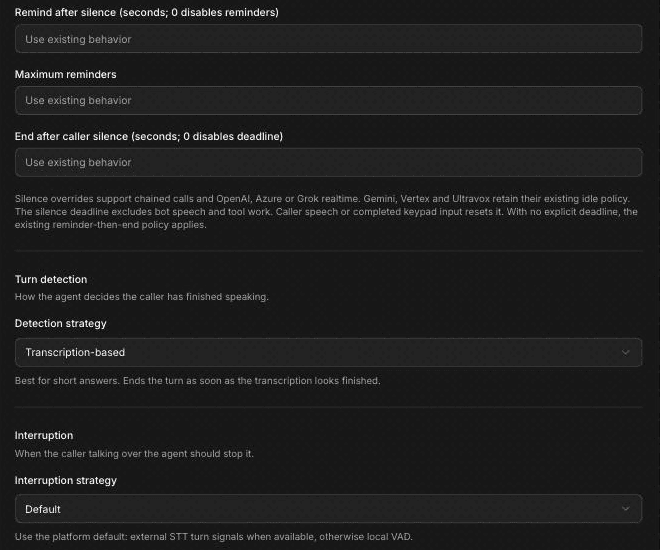
Turn detection
Turn detection is "How the agent decides the caller has finished speaking." Choose a Detection strategy:
- Transcription-based (the default): "Best for short answers. Ends the turn as soon as the transcription looks finished."
- Smart turn analyzer: "Best for longer answers with natural pauses. Uses a model to spot the end of a turn." Test it with real calls before you rely on it.
Interruption strategy
Interruption controls "When the caller talking over the agent should stop it." Choose an Interruption strategy:
- Default: "Use the platform default: external STT turn signals when available, otherwise local VAD." (VAD is voice activity detection.)
- Minimum words: the caller has to say a few words before the agent stops, so a cough or a dog bark is less likely to cut the agent off.
- Provisional VAD (marked Experimental): the agent pauses when it hears the caller, then confirms the interruption from the transcription.
The page also notes: "Interruption sensitivity and backchannels work with either local turn detector when default local VAD is active. Realtime speech models and Flux provider-owned turns retain their provider controls." In other words, some models and transcription providers handle turn-taking themselves, and these settings don't change them.
Step-level overrides
"Steps can override these settings and restore them on exit." Each Agent step has its own interruption, timing, silence and backchannel fields in Additional settings, such as Allow Interruption, Interruption Sensitivity, Response Wait (ms), Idle Reminder (ms) and Backchannel. A blank step field inherits the agent setting. When the call leaves the step, the agent settings apply again.
Use overrides for steps that behave differently from the rest of the call:
- A step that collects a service address or callback number: a longer Response Wait (ms), so the agent doesn't jump in between the house number and the street.
- A step that reads a disclosure the caller must hear in full: Allow Interruption off.
- A step where the caller describes the problem: Backchannel on.
Step fields use milliseconds, while the agent settings use seconds. For every field and its limits, see Configure an Agent step.
Troubleshooting table
Change one setting at a time, save, then test again. A test call to your phone gives the most realistic sense of timing.
| Symptom | Setting to check |
|---|---|
| The agent replies before the caller has finished, for example halfway through an address | Raise Response wait, turn on Adapt wait to caller pauses, or apply the Natural conversation preset. For one step, raise Response Wait (ms) on that step. |
| Long pauses before every reply | Lower Response wait. |
| The agent talks over callers who try to cut in | Raise Interruption sensitivity. Check the step's Allow Interruption isn't off. |
| Background noise or a quick "uh-huh" stops the agent mid-sentence | Lower Interruption sensitivity, or set Interruption strategy to Minimum words. |
| Too many "Mm-hmm"s | Lower Backchannel frequency, or set Backchannels to Off. |
| The caller isn't sure the agent is still listening during a long explanation | Turn Backchannels on, or turn them on for that step. |
| The agent nags a caller who's gone to check the equipment | Raise Remind after silence or lower Maximum reminders. |
| Calls hang up while the caller is fetching information | Raise End after caller silence, or set it to 0 to turn the deadline off, and check Caller idle timeout in Call limits. |
| A setting seems to have no effect | Check the agent isn't using a speech-to-speech model, and that Detection strategy matches the field (response wait needs Transcription-based). Check whether the step overrides it. |
Frequently asked questions
What is backchanneling?
Backchanneling is the agent saying short listening sounds, such as "Mm-hmm" or "I see", while the caller is still talking. You turn it on with Backchannels, set how often with Backchannel frequency, and choose the words with Backchannel phrases (comma separated).
Why does my voice agent talk over callers?
Usually the response wait is too short for how that caller speaks, or the turn detector ends the turn at a natural pause. Try a longer Response wait, turn on Adapt wait to caller pauses, or apply the Natural conversation preset. If the agent keeps talking after the caller cuts in, raise Interruption sensitivity.
How long should the agent wait before responding?
There's no single right number, so start with a preset and adjust from real test calls. Keep the wait short for yes-or-no questions and give extra time in steps where callers read out addresses or numbers, using a step-level Response Wait (ms) override.
What happens when the caller goes quiet?
After the time in Remind after silence, the agent checks in, up to Maximum reminders times. If you set End after caller silence, the call ends once the caller has been silent that long, not counting time the agent is speaking or running a tool. Without a deadline, the existing reminder-then-end policy applies.
Which preset should I start with?
Start with Natural conversation, which the app marks as recommended. It gives "semantic turn completion with a 0.6-second fallback, responsive interruptions, acknowledgments, and one reminder after 10 seconds." Try the Responsive speech-timeout profile if callers feel the agent is slow to reply, then compare the two on test calls.
Related articles
Set your voice agent's language | FieldCamp
Set the language your FieldCamp voice agent listens for, use auto-detect when callers speak more than one language, and match voices, prompts and audio clips.
Improve pronunciation and call audio | FieldCamp
Teach your voice agent to say brand and street names correctly, speak numbers and dates naturally, reduce background noise, and boost key words.