 FieldCamp
Set up transitions and conditions | FieldCamp
Connect steps with transitions, write the conditions that move a call forward, add transition speech, and plan a path for when a call transfer fails.
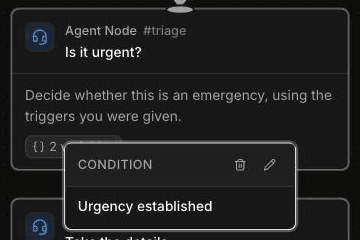
A transition is the connection between two steps in a voice agent. It tells the agent when the call is ready to move on and where to go next. In the Missed-call receptionist template, for example, the "Urgency established" transition moves the call from "Is it urgent?" to "Take the details" once the agent knows what's wrong and whether it's an emergency.
This page covers the transitions you draw between conversation steps. For the canvas itself, see the Agent Builder overview.
How transitions work
To create a transition, drag from the dot at the bottom of one step to the dot at the top of the next. The type of step you start from decides how the transition behaves:
- From a conversation step (Start Call or Agent Node): you write a label and a condition. During the call, the agent checks the conversation against the conditions on the step's outgoing transitions and takes the one that matches.
- From an Extract Variables step: only one outgoing transition is allowed. Voice creates it for you with the label "Continue" and the condition "Extraction complete". It's silent and continues as soon as extraction finishes. See Capture caller details with Extract Variables.
- From a Logic Split step: each transition is a branch with rules on your variables rather than a written condition. Branches are silent, and exactly one must be the else branch. See Branch a call with the Logic Split step.
Some steps don't need an incoming transition at all. A step with a Global Transition Condition can be entered from anywhere in the call, for example when a caller mentions a gas smell partway through booking. You set that on the step, not on a connection. See Use the Global step and global routing.
To edit a transition, select it and click the edit icon on its CONDITION pill, or double-click its label. The pill's trash icon deletes the transition.
Write conditions
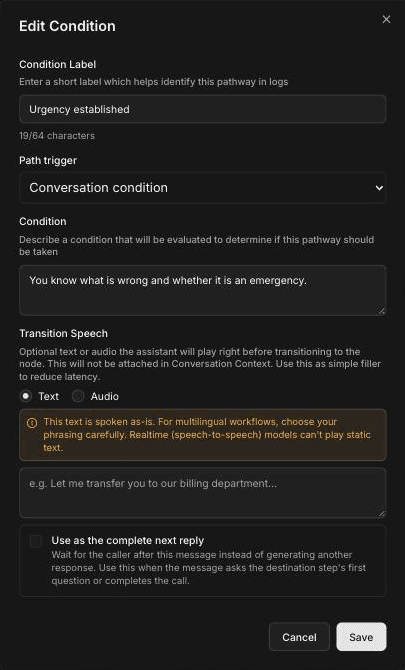
Editing a transition opens the Edit Condition dialog.
Add a condition label
In Condition Label, enter a short name for this path, up to 64 characters. The label identifies the path in call logs. Each label must be unique among the transitions that leave the same step.
Choose the path trigger
Under Path trigger, keep Conversation condition for normal transitions. Choose Transfer failed only for a backup path after a call transfer (see Handle a failed transfer).
Describe the condition
In Condition, describe what must be true for the call to take this path. Write it as a fact about the conversation, for example "You know what is wrong and whether it is an emergency."
Save
Optionally add transition speech (below), then click Save.
Good conditions are specific and easy to check against what the caller has said. Compare these for an HVAC agent:
| Vague | Clear |
|---|---|
| Caller is done | The caller has given their name, service address and callback number |
| Emergency | The caller reports a situation that matches one of your emergency triggers |
| Wants to book | The caller agreed to a visit and chose a day |
Emergency triggers are your company's rules. Write them in the step's prompt or the Global step, then refer to them in the condition.
When a step has several outgoing transitions, make their conditions clearly different so only one can match at a time. For a plumbing agent, "The caller reports active water leaking now" and "The caller has a slow drain or other non-urgent problem" don't overlap.
Add transition speech
Transition Speech is an optional line the agent plays right before it moves to the next step. It covers the short pause while the next step starts. Choose Text to have the agent speak your words, or Audio to play a recording from your audio clips.
For example: "Thanks, let me get a few details so a technician can call you back."
Keep these limits in mind:
- The text is spoken exactly as written. For agents that speak several languages, choose your phrasing carefully; see Set your voice agent's language.
- Realtime (speech-to-speech) models can't play static text. See Choose a model and voice.
- Transition speech isn't added to the conversation context, so later steps don't know it was said.
- Logic Split and Extract Variables paths are silent and don't take transition speech.
Use as the complete next reply
By default, after the transition speech the next step generates its own reply. Select Use as the complete next reply when your transition speech already does that job, so the agent waits for the caller instead. Use it when the line asks the next step's first question, or when it completes the call.
For example, if the next step collects the address, the transition speech "Thanks. What's the service address?" can be the complete next reply. Without the checkbox, the agent might ask for the address twice. The checkbox only works when transition speech is set.
Handle a failed transfer
When a step can transfer the caller to a person, plan for the transfer not going through. Nobody might answer, or the carrier might reject the caller ID.
- Attach a transfer tool to the step. See Transfer a call to a person.
- Draw a transition from that step to the step that should take over, such as an Agent Node that takes a message.
- In Edit Condition, set Path trigger to Transfer failed and choose the transfer tool on this step.
This path runs only when that transfer tool fails. Each step can have one failed-transfer path per transfer tool, and the tool must be attached to the same step. A good fallback tells the caller that nobody could take the call and takes a message or books a callback, following your rules.
Warm transfer works only with Twilio. Browser Test Audio doesn't place real transfers, so test the live transfer on a phone call.
Common mistakes
- Duplicate labels. Two transitions leaving the same step can't share a label. Voice shows a validation error until you rename one.
- Overlapping conditions. If two conditions can both be true, the call may take the one you didn't expect. Make each one describe a distinct situation.
- Conditions that restate the step. "Agent asked the question" is met as soon as the question is asked. Describe what the caller has told you instead.
- No way out. Check that every path through the agent eventually reaches an End Call step, or passes a step that has the End call tool.
- Transition speech that repeats the next question. Either select Use as the complete next reply or move the question out of the speech.
- No failed-transfer path. Without one, a transfer that doesn't connect has nowhere planned to go.
Frequently asked questions
How does the agent decide when to move to the next step?
During the call, the agent compares the conversation with the conditions on the current step's outgoing transitions and takes the one that matches. Logic Split and Extract Variables steps move on silently, using rules or finished extraction instead.
How do I write a clear condition?
Describe a fact about the conversation that is easy to check, such as "The caller has given their name, service address and callback number." Avoid one-word conditions, and make sure conditions leaving the same step can't both be true.
What is transition speech?
It's an optional text line or audio clip the agent plays right before moving to the next step. It fills the short pause while the next step starts, and it isn't added to the conversation context.
What happens when a transfer fails?
If the step has a transition with the path trigger set to Transfer failed for that transfer tool, the call follows it, for example to a step that takes a message. Without one, you haven't planned where the call goes, so add a failed-transfer path to every step that transfers.
Can one step have several transitions?
Yes. A conversation step can have several outgoing transitions, each with its own label and condition. An Extract Variables step can have only one, and a Logic Split step needs exactly one else branch alongside its rule branches.
Related articles
Use API trigger, webhook, and QA steps | FieldCamp
Start calls from your own systems with the API trigger, send call data out with a webhook step, and review call quality with the QA analysis step.
Use dynamic variables in voice agents | FieldCamp
Use dynamic variables in FieldCamp Voice to personalize calls with pre-call data, details the caller gives, built-in dates and times, and fallbacks.