 FieldCamp
Improve pronunciation and call audio | FieldCamp
Teach your voice agent to say brand and street names correctly, speak numbers and dates naturally, reduce background noise, and boost key words.
A voice agent that mispronounces your street names or a customer's equipment brand sounds careless, and one that mishears "condenser coil" asks the caller to repeat themselves. FieldCamp Voice has separate controls for how the agent speaks and how it hears:
- Speaking: the pronunciation dictionary and Speak numbers, dates and currency naturally.
- Hearing: Input denoising and the Dictionary of words to listen for.
- Ambient noise is different again: it's a sound the agent plays on its own side of the call.
All of these are in the agent's settings. On the Voice agents page, open the agent's row menu and choose Settings, or click the gear button on the builder canvas. The first three controls are in General under Audio and pronunciation. The Dictionary has its own section.
The pronunciation dictionary and the other speech (text-to-speech) controls don't work with speech-to-speech (realtime) models: "Realtime voices do not support these TTS controls." They need the Model and voice option on the Models page. See Choose models and voices.
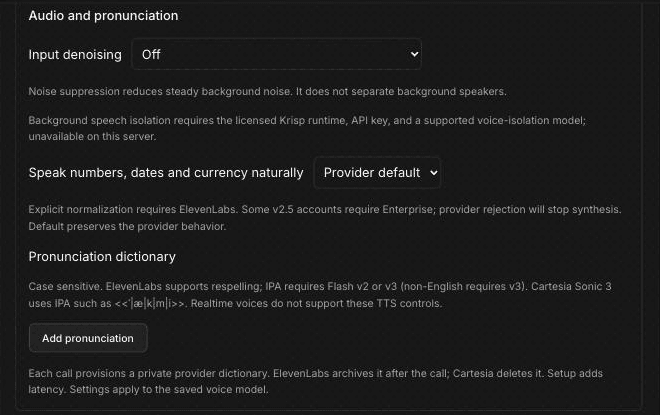
Pronunciation dictionary
The pronunciation dictionary tells the voice how to say specific words. Use it for words a voice gets wrong, such as:
- Street and town names: "Worcester Street" or "Ravensbourne Road".
- Equipment brands: HVAC and water heater brands such as "Daikin" or "Navien".
- Your own company name, if it's an unusual spelling.
To add a rule:
- Under Pronunciation dictionary, click Add pronunciation.
- In Word, type the word exactly as it appears in your prompts. Rules are case sensitive, so "Rheem" and "RHEEM" are different entries, and each word can appear only once.
- Choose the type: Respelling or IPA.
- In Pronunciation, type how it should sound. For a respelling, write it the way it sounds, for example "Wuster Street" for "Worcester Street".
- Click Save changes.
You can add up to 100 rules. Use Remove to delete one.
For a fixed message that must sound exactly the same on every call, such as a recorded greeting, you can play an audio clip instead.
Which type works depends on the voice you've chosen:
| Voice provider | Respelling | IPA |
|---|---|---|
| ElevenLabs | Yes | Only with Flash v2 or v3 voice models. Non-English words need v3. |
| Cartesia | No | Sonic 3 only, written in Cartesia's phoneme syntax |
| Other providers | No | No |
Cartesia IPA goes inside double angle brackets, with a vertical bar between sounds, for example <<ˈ|æ|k|m|i>>.
Two things to know from the page: "Each call provisions a private provider dictionary. ElevenLabs archives it after the call; Cartesia deletes it. Setup adds latency." Keep the list to words the voice actually gets wrong. "Settings apply to the saved voice model", so check your rules again if you change the voice model on the Models page.
Speak numbers, dates and currency naturally
This setting controls how the voice reads things like "$1,250", "3/14" or "10:30am". It has three options:
- Provider default: "Default preserves the provider behavior."
- On: asks the voice to read numbers, dates and currency as a person would say them.
- Off: turns that behavior off.
"Explicit normalization requires ElevenLabs." With another voice provider, the setting can't be saved as On or Off. "Some v2.5 accounts require Enterprise; provider rejection will stop synthesis", which means the agent would go silent. If you turn it on, place a test call straight away and listen for a normal reply.
For phone numbers, addresses and work-order numbers, also tell the agent in its prompt how to read them back, for example "read phone numbers back in groups of three and four digits". See Write voice agent prompts for field service.
Input denoising
Input denoising cleans up the caller's audio before it's transcribed. It has three options:
- Off (the default).
- Noise: "Noise suppression reduces steady background noise. It does not separate background speakers." This suits a caller standing next to a running condenser, a generator or a shop vac, or calling from a truck cab.
- Noise + background speech: also isolates the caller's voice from other people talking nearby, such as a crew on a job site or a TV in a restaurant kitchen.
The denoising options depend on what's installed on the server. If they show as Noise — unavailable and Noise + background speech — unavailable, only Off can be used. The page explains: "Background speech isolation requires the licensed Krisp runtime, API key, and a supported voice-isolation model; unavailable on this server."
Ambient noise (added on the agent's side)
Ambient noise is not noise reduction. It adds sound to the call: "Play quiet background sound so the line doesn't feel dead." Callers hear a faint office background behind the agent instead of complete silence between sentences.
To add it:
- In General, under Ambient noise, turn on Use ambient noise.
- Set Volume between 0 and 1. Keep it low.
- Optionally, under Custom audio file, click Upload audio file (max 10MB) to use your own loop. With no file, the page shows "Using the default office ambience."
- Click Save changes.
Ambient noise is a matter of taste. Some businesses like a quiet office sound. Others prefer a clean line. Keep the volume low so it never competes with the agent's voice.
Dictionary: words to listen for
The Dictionary section is about hearing, not speaking: "Words the agent should listen out for — company jargon, product names, local street names. Some providers charge extra for this." The header shows how many phrases you've added, for example "0 boosted phrases".
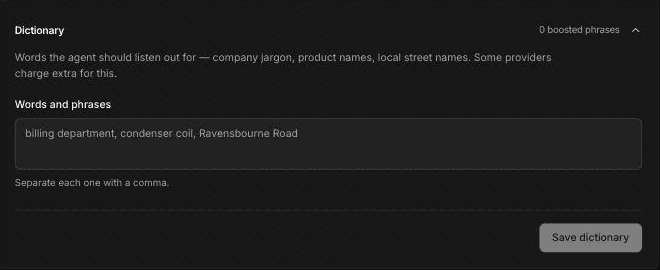
- In Words and phrases, type the terms your callers use, separated by commas. For example:
condenser coil, heat pump, backflow preventer, grease trap, Navien, Ravensbourne Road. - Click Save dictionary.
- Close the section, then open it again and check that your phrases are still there and the header count has changed. A save that didn't go through can look successful, so if your phrases are missing, add them again and save.
Good candidates are part and equipment names, brand names, your service names, and the street and neighborhood names in your service area.
Only some transcription providers use this list: Deepgram, AssemblyAI and Speechmatics. Other transcription providers and speech-to-speech models ignore it. Check the Transcription model on the Models page, or the agent's Model overrides, before you rely on it.
Test your changes
After you save, listen to the result on a real call. A test call to your phone is the best way to hear pronunciation and background sound as a caller would. For timing issues rather than audio, see Tune turn-taking and interruptions.
Frequently asked questions
What is a pronunciation dictionary?
It's a list of words with instructions for how the voice should say them, written as a respelling or in IPA. You add rules under Pronunciation dictionary with Add pronunciation. It works with ElevenLabs and Cartesia Sonic 3 voices, and not with speech-to-speech models.
How do I make the agent read numbers and addresses naturally?
With an ElevenLabs voice, set Speak numbers, dates and currency naturally to On and test right away, because some accounts reject it and the agent then can't speak. Add pronunciation rules for street names the voice gets wrong, and tell the agent in its prompt how to read back phone and work-order numbers.
Does noise reduction help callers on job sites or in trucks?
When it's available, Noise reduces steady background noise such as engines, fans and compressors, and Noise + background speech also separates the caller from people talking nearby. If both options show as unavailable, only Off can be selected.
What is ambient noise, and should I add it?
Ambient noise is a quiet background sound the agent plays so the line doesn't sound dead between sentences. It doesn't clean up the caller's audio. It's optional, and if you use it, keep the volume low.
How do I help the agent hear brand or part names?
Add them to Words and phrases in the Dictionary section, separated by commas, click Save dictionary, then reopen the section to check the phrases were kept. The list is used only with Deepgram, AssemblyAI or Speechmatics transcription, so check your transcription model first.
Related articles
Tune turn-taking and interruptions | FieldCamp
Control how long your voice agent waits before replying, how easily callers can interrupt, backchannel acknowledgments, idle reminders, and silence hang-ups.
Detect voicemail and phone menus | FieldCamp
Set your voice agent to detect voicemail and automated phone menus, then hang up, leave a fixed message, or generate a message from your own instructions.