 FieldCamp
End a call with the End Call step | FieldCamp
Close voice agent calls cleanly with the End Call step: write a closing prompt, confirm what happens next, and learn when to use the End call tool instead.
The End Call step is the planned end of a conversation. The Add a step panel describes it as the step that "Closes the conversation and hangs up." The agent runs one last exchange, such as reading back the caller's details, and then ends the call.
Voice also has an End call tool, which lets the agent hang up in the middle of any step. The two do different jobs; see End Call step vs End call tool.
What the step does
- It's the last step on its path. It can't have outgoing connections.
- Other steps connect into it with a condition, such as "Details captured". An End Call step can also be reached from anywhere in the call through a global route, with no incoming connection.
- An agent can have more than one End Call step, one for each way a call can end, such as "Successful close" and "Polite decline".
- Its Prompt controls what the agent says in the closing exchange before it hangs up.
In the Missed-call receptionist template, the "Take the details" step connects to an End Call step named "Confirm and close" through the condition "Details captured".
Write the closing prompt
Double-click the End Call step, or select it and click the pencil icon, to open Edit End Call.
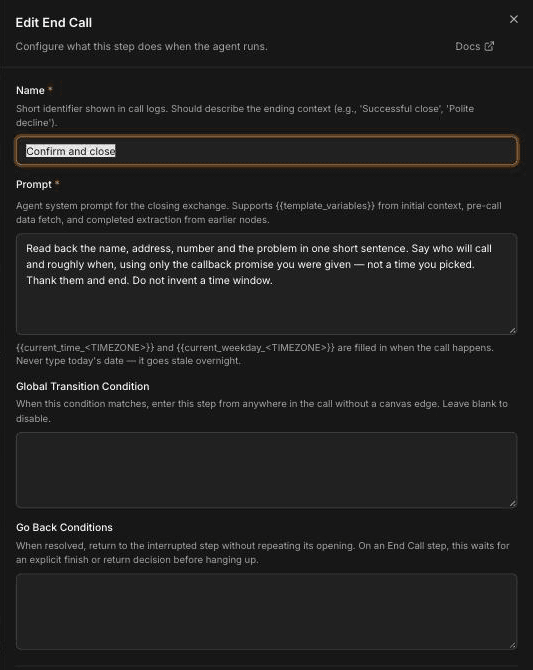
Name the ending
In Name, describe how the call ends. The help text suggests names such as "Successful close" or "Polite decline". The name shows in call logs.
Write the prompt
In Prompt (required), tell the agent what to confirm and how to finish. It supports {{variables}}, including values extracted earlier in the call.
Check Allow Interruption
In Additional settings, find Allow Interruption. When it's on, "the caller can interrupt the closing message before the call hangs up. Leave false only for intentionally non-interruptible disclosures." Turn it on so a caller can correct a detail during the read-back. For how interruptions work across the agent, see Tune turn-taking and interruptions.
Save
Click Save, then save your canvas changes.
What the agent should confirm before hanging up
A good closing is short and leaves the caller sure of what happens next:
- Read back the key details in one sentence: name, service address, callback number and the problem.
- Say what happens next, using only what the agent was told. If the agent doesn't know the arrival time, it shouldn't guess one.
- Thank the caller and end. Don't open a new topic.
When the call ends, it appears in Voice under Calls and the agent's Call history, with the recording and transcript, so your team can pick up from the read-back. If you've connected FieldCamp and the call came through a FieldCamp call flow, its result also lands on the customer's thread in the FieldCamp Inbox.
The template's prompt does exactly this:
Read back the name, address, number and the problem in one short sentence.
Say who will call and roughly when, using only the callback promise you were
given — not a time you picked. Thank them and end. Do not invent a time window.
The Global Transition Condition and Go Back Conditions fields work the same way as on an Agent step. For an End Call step, Go Back Conditions make the agent wait for an explicit finish or return decision before hanging up, so a caller who says "Oh, one more thing" isn't cut off. See Use the Global step and global routing.
You can also turn on Enable Variable Extraction on this step to capture final details before the call ends.
End Call step vs End call tool
| End Call step | End call tool | |
|---|---|---|
| What it is | A step on the canvas | A tool you create on the Tools page and select on a step |
| How the call gets there | A connection's condition, or a global route | The agent decides to use it during any step that has it selected |
| What the caller hears | A closing exchange from the step's Prompt | An optional goodbye message, custom or pre-recorded |
| Best for | The planned end of a flow, with a read-back | Ending early: wrong numbers, spam, or a caller who says goodbye mid-step |
Use End Call steps for the ways you expect calls to end. Add the End call tool to steps where the caller might need to leave early. Only the tools a step has selected are available to that step, so the agent can't hang up from a step that doesn't have the tool.
Example closings
HVAC, after-hours details taken ("Successful close"):
Read back the caller's name, address, callback number and the problem in one
sentence. Tell them the on-call team will review it and call back, using the
callback promise in your instructions. Don't give a time. Thank them and end.
Plumbing, outside the service area ("Polite decline"):
Tell the caller, kindly, that we don't cover their area. Don't recommend
another company. Thank them for calling and end.
Grease trap route, pickup confirmed (outbound):
Confirm the site address and the pickup day the contact agreed to, in one
sentence. Thank them and end.
Electrical, caller not interested (outbound):
Thank the caller for their time, say you've noted that they're not
interested, and end.
Each closing works best with the details it needs already captured in earlier steps. See Capture caller details with Extract Variables.
Frequently asked questions
How do I end a call professionally?
Connect your last conversation step to an End Call step and write a closing prompt that reads back the key details, says what happens next without guessing times, and thanks the caller. Turn on Allow Interruption so the caller can correct a detail.
What's the difference between the End Call step and the End call tool?
The End Call step is a planned ending on the canvas, reached through a connection or global route, and it runs a closing exchange. The End call tool is something the agent can use during any step that has it selected, to hang up early.
What should the agent confirm before hanging up?
Have it read back the caller's name, service address, callback number and problem, and say what happens next using only what it was told. It shouldn't invent a time window.
Can one agent have several End Call steps?
Yes. Add one for each way a call can end, such as a successful close and a polite decline, and name each one for its ending so it's easy to spot in call logs.
Can the caller stop the agent from hanging up too early?
Yes, if you add Go Back Conditions to the End Call step. The step then waits for an explicit finish or return decision before hanging up, so the caller can bring up something else.
Related articles
Navigate phone menus with the Press Digit step | FieldCamp
Use the Press Digit step so outbound voice agents can navigate another company's phone menu (IVR) by sending keypad tones to reach the right department.
Use API trigger, webhook, and QA steps | FieldCamp
Start calls from your own systems with the API trigger, send call data out with a webhook step, and review call quality with the QA analysis step.