 FieldCamp
Fixed Time Scheduling for Online Booking | FieldCamp
Set up fixed time scheduling in FieldCamp to let customers book exact appointment slots online. Configure service durations, team schedules, and smart routing.
Fixed Time Scheduling lets customers book specific appointment times with exact start and end times. This is the best scheduling format for field services that require precise timing, such as installations, inspections, or scheduled maintenance.
FieldCamp offers three scheduling formats. If your business works better with time ranges like "between 8 AM and 12 PM," see Arrival Windows with Manual Capacity or Arrival Windows with Provider-Based Capacity instead.
What Is Fixed Time Scheduling?
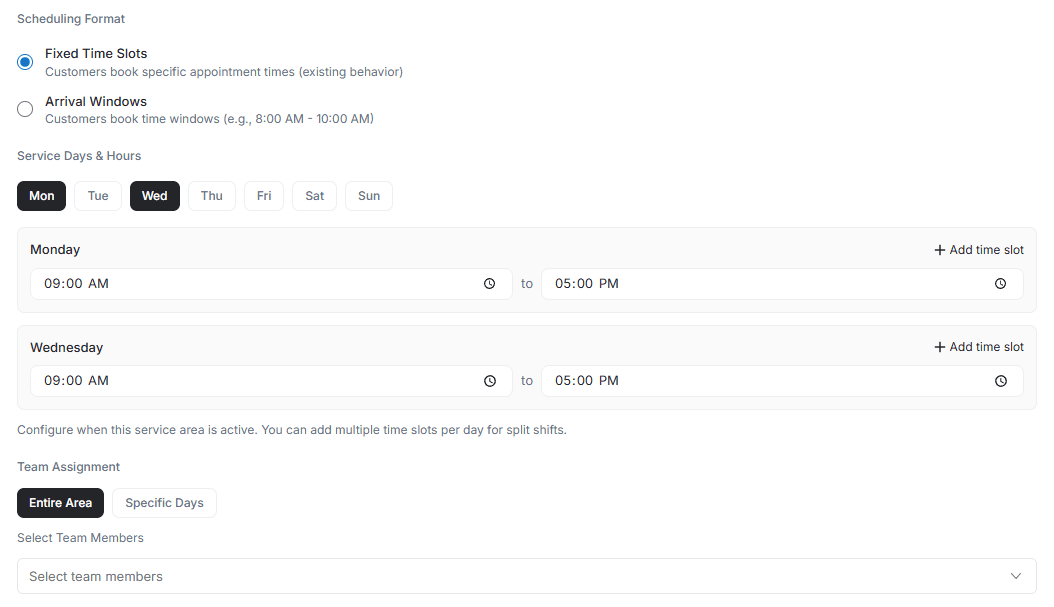
Fixed Time Scheduling lets customers book specific appointment times with exact start and end times. Perfect for field services requiring precise timing like installations, inspections, or scheduled maintenance.
Example: Customer books 2:00 PM - 3:00 PM for an HVAC inspection.
How Customers Book Appointments
The Booking Process
- Select Service — Customer chooses what they need from your service list
- See Available Times — Exact time slots appear like 9:00 AM - 10:00 AM or 2:00 PM - 3:00 PM
- Pick Their Time — Customer selects their preferred appointment slot
- Get Confirmation — Instant confirmation with exact service timing
The scheduling algorithm automatically factors in travel time between appointments, ensuring technicians arrive on time.
Setting Up Fixed Time Scheduling
Before you begin, make sure you have completed Setting Up Online Booking and defined your service areas.
Step 1: Configure Service Area
Navigate to Settings → Service Areas to get started.
- Choose your area type — Radius, Polygon, or Zip Code
- Define your service territory based on where your team operates
- Select "Fixed Time Slots" as the scheduling format
- Save your settings
Step 2: Set Service Durations
Define how long each service takes in your system.
| Service Type | Typical Duration |
|---|---|
| Installation services | 2-4 hours |
| Repair services | 1-2 hours |
| Maintenance visits | 30-90 minutes |
| Inspections | 45-60 minutes |
The system calculates travel time between jobs and only shows available slots that work with your team's schedule.
Step 3: Configure Your Business Schedule
Set your business hours for each day of the week. Define any lunch breaks or blocked times when you are unavailable. Add holidays and blackout dates when you are closed.
For team schedules, set individual working hours for each team member. Configure skill-based assignments if certain services need specific technicians. Manage personal time off directly in the system.
Step 4: Assign Team Members
- Select which team members work in each service area
- Set their individual availability if it differs from standard hours
- Configure skill requirements for specialized services
- Save all assignments to activate the schedule
Configuration Examples
HVAC Services Setup
For system installations, set a 4-hour duration with morning (8:00 AM - 12:00 PM) and afternoon (1:00 PM - 5:00 PM) slots. The algorithm automatically blocks appropriate time based on the customer's location and technician's route.
Plumbing Services Setup
Repair services typically need 90-minute slots. The system creates appointments throughout the day while optimizing routes between jobs to minimize travel time.
Electrical Services Setup
Safety inspections work well with 60-minute appointments. The algorithm factors in travel from previous jobs when showing available slots to customers.
Advanced Features
Multiple Service Durations
Configure different durations for different service levels in your business. You can manage these through Products & Services.
| Service Level | Duration |
|---|---|
| Quick fixes | 30 minutes for minor repairs |
| Standard services | 60-90 minutes for regular repairs |
| Major repairs | 2-3 hours for complex issues |
| Full installations | 4-8 hours for new system setups |
Dynamic Scheduling Options
The system supports team-based availability where different technicians work different hours. You can set service-specific hours so certain services are only available at specific times. Seasonal adjustments let you modify schedules based on busy or slow periods.
Smart Algorithm Features
- Automatic travel time calculation ensures realistic scheduling between appointments
- Route optimization groups nearby appointments together for efficiency
- Real-time availability updates slots instantly based on current bookings and locations
Benefits
For Your Business
Predictable schedules let you know exactly when each appointment starts and ends. The algorithm optimizes technician routes for maximum efficiency. Clear team and equipment allocation improves resource management.
For Your Customers
Customers can plan their day around exact appointment times. Service starts at the scheduled time with no waiting. Clear expectations mean they know exactly when to be available.
Start with longer service durations than you think you need, then shorten them after reviewing actual completion data. It is easier to add more availability than to deal with overbooked technicians running behind schedule.
Best Use Cases
| Use Case | Examples |
|---|---|
| Installation Services | Equipment installation, system setup, appliance installation where precise timing matters |
| Scheduled Maintenance | Preventive maintenance programs, regular inspections, service contracts |
| Repair Services | Non-emergency repairs, warranty work, follow-up visits |
| Specialty Services | Pool and spa maintenance, solar panel installation, security system setup |
Tips for Success
Best Practices
- Trust the algorithm to handle travel time calculations and route optimization automatically
- Start conservative with longer service durations, then adjust based on actual completion times
- Monitor popular times to understand when customers prefer to book services
- Review regularly and adjust durations based on real service data
- Communicate clearly about service duration and arrival times with customers
Common Mistakes to Avoid
- Setting durations too short leads to rushed work and poor service quality
- Overriding smart scheduling with manual changes can break route optimization
- Being too rigid without accounting for service complexity variations frustrates technicians
- Offering too few time slots limits customer choice and reduces bookings
Transitioning from Manual Scheduling
Migration Steps
Start by analyzing your current appointment patterns and typical service durations. Use this historical data to set realistic time slots in the system.
Train your team on the new automated system before launch. Consider a gradual rollout with select services or team members first. Monitor performance closely and fine-tune durations based on actual results.
Customer Communication
- Send advance notice about your new online booking system
- Explain the benefits of precise scheduling and guaranteed appointment times
- Offer assistance for customers unfamiliar with online booking
- Keep phone booking available during the transition period
How the Algorithm Works
Intelligent Slot Management
The system automatically calculates drive time between customer locations using real-time traffic data. It only shows slots when technicians can realistically arrive on time.
Appointments are grouped intelligently to minimize travel and maximize daily productivity. As new bookings come in, available slots adjust in real-time to maintain efficient routing.
Common Scenarios
Morning Service Window
Set your availability from 8:00 AM to 12:00 PM with 45-minute service durations. The algorithm calculates travel between jobs automatically, creating dynamic slots based on location.
All-Day Coverage
With 8:00 AM to 5:00 PM availability and 60-minute service durations, the algorithm optimizes full-day routing, maximizing jobs completed while minimizing travel time.
Major Installations
For full-day projects, set 8-hour durations from 8:00 AM to 5:00 PM. The algorithm blocks the entire day for one team, ensuring they have adequate time for complex installations.
Field Service Examples
HVAC Company Implementation
A typical HVAC company might offer 60-minute maintenance visits, 90-minute repairs, and 4-hour installations. The smart scheduling algorithm groups nearby appointments, automatically adjusts for traffic patterns, and optimizes technician routes daily.
Plumbing Service Setup
Plumbing services often include 45-minute drain cleanings, 90-minute fixture repairs, and 3-hour water heater installations. The algorithm factors in time for parts pickup, adjusts for emergency call-outs, and maintains service area efficiency throughout the day.
Quick Setup Checklist
Before launching, make sure you have completed these steps:
- Defined service area boundaries and selected "Fixed Time Slots" format
- Set appropriate service durations for each type of work
- Configured your business hours and assigned team members
- Tested the booking process as a customer would experience it
- Launched to your customers
Related Articles
- Arrival Windows with Manual Capacity — set custom booking limits per time window
- Arrival Windows with Provider-Based Capacity — automatic capacity based on team and service duration
- Setting Up Online Booking — initial configuration for accepting online bookings
- Service Areas — define where your business operates and accepts bookings
Embeddable Chat Widget | FieldCamp
How FieldCamp delivers an embeddable chat assistant — through the Online Booking widget, with a configurable assistant and a knowledge base you control.
Arrival Windows with Manual Capacity | FieldCamp
Configure arrival windows with manual capacity limits in FieldCamp's online booking. Control exactly how many jobs each time slot accepts per day for scheduling.