 FieldCamp
AI Chat Assistant Setup for Online Booking | FieldCamp
Set up and customize the AI-powered chat assistant on your FieldCamp online booking page to answer customer questions, qualify leads, and hand off to your team.
FieldCamp's AI Chat Assistant acts as a virtual receptionist on your online booking page. It greets visitors, answers common questions using your business knowledge, and hands conversations off to your team in FieldCamp Inbox when human help is needed. The assistant supports markdown-formatted responses for rich, readable replies.
This assistant handles chat on your booking page. For phone calls, see AI Receptionist voice agents in the FieldCamp Voice docs.
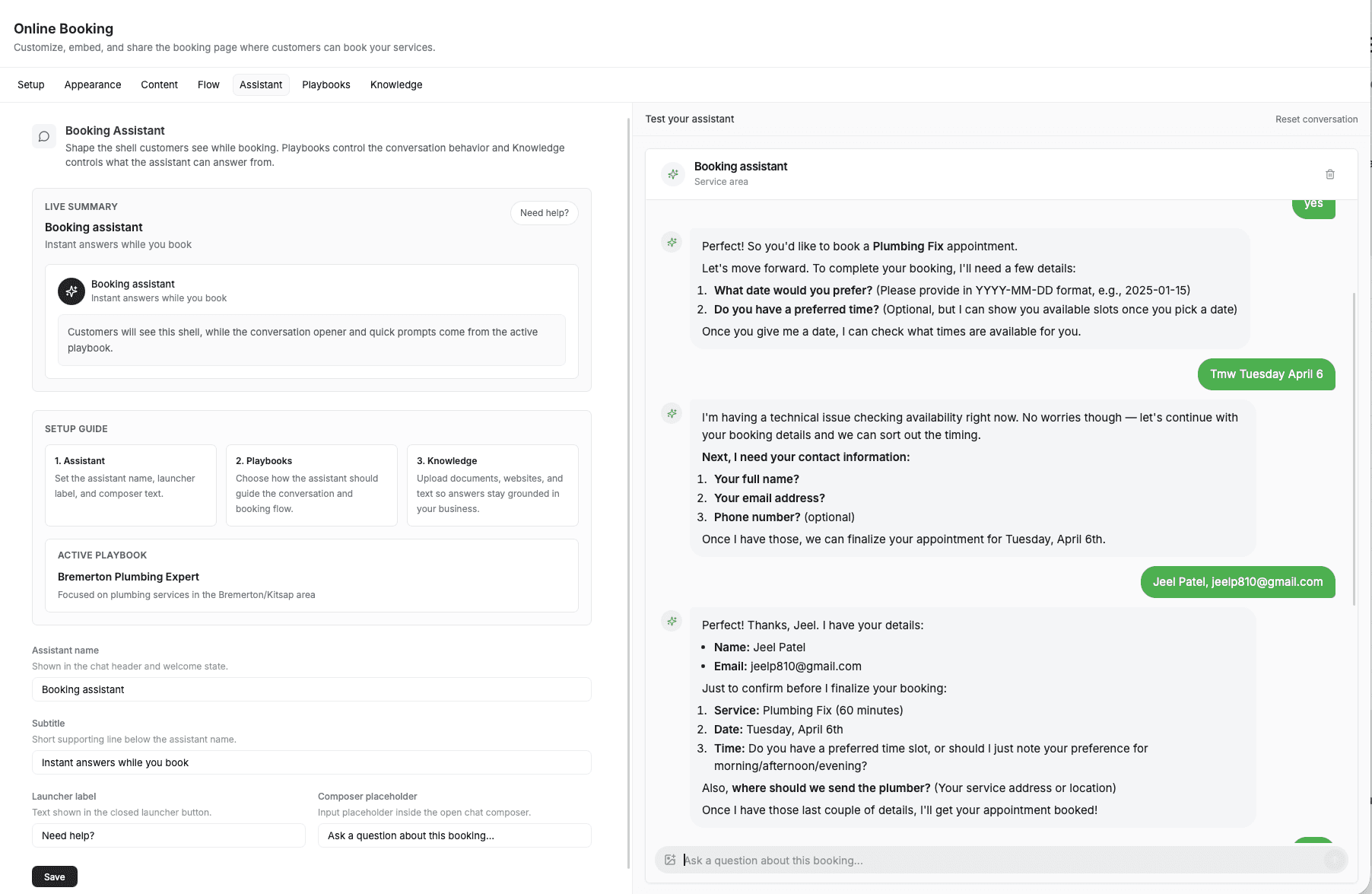
To get started, go to Settings → Online Booking → Assistant.
How the Chat Assistant Works
When a customer visits your booking page, they see a "Chat with our Receptionist" button alongside the standard booking options. Clicking it opens an AI-powered chat window.
The assistant:
- Answers customer questions using knowledge you provide about your business.
- Follows conversation playbooks you define for tone, topics, and boundaries.
- Renders rich responses with markdown formatting for links, lists, and emphasis.
- Hands off to a human when it cannot answer confidently or the customer requests a person. The full thread appears in FieldCamp Inbox so your team has complete context.
Configuring the Assistant
Open the Assistant tab to customize these settings.
- Assistant Name — the name displayed in the chat header. Customers see this as the sender of each message. Use a human-sounding name ("Sarah") or a brand name ("Acme Support").
- Subtitle — a short line below the assistant name. Use it to set expectations (e.g., "We typically reply in a few minutes").
- Launcher Label — the text on the floating chat button (e.g., "Chat with our Receptionist"). Keep it brief and action-oriented.
- Composer Placeholder — placeholder text in the message input field (e.g., "Describe the service you're looking for...").
Every message exchanged through the chat assistant is stored in FieldCamp Inbox, whether handled by AI or a team member. This gives you a single place to review all customer conversations.
Human Handoff Flow
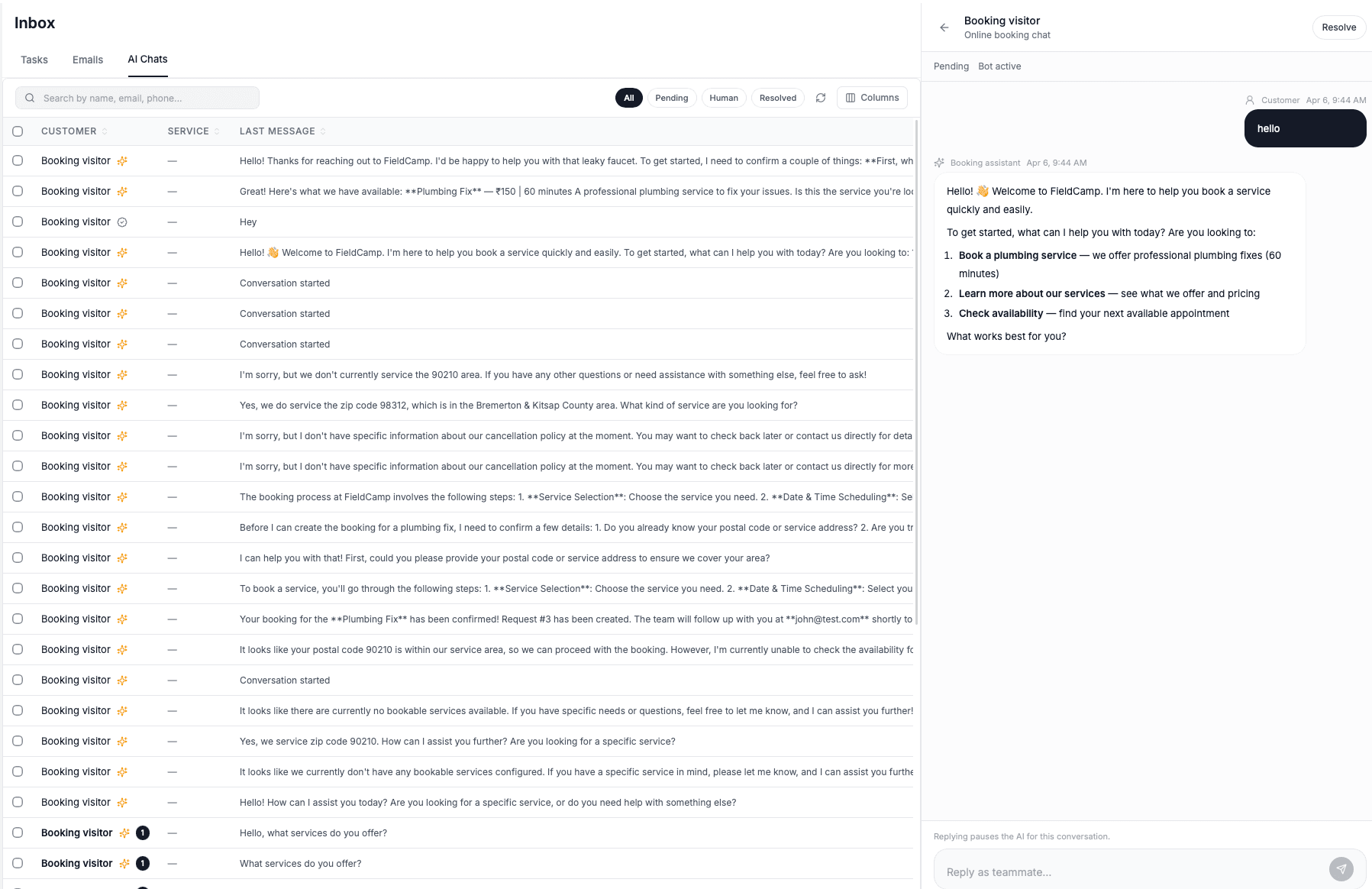
- Customer starts a conversation with the AI assistant.
- The AI responds using your knowledge base and playbooks.
- Handoff triggers when the AI cannot answer confidently, the customer asks for a person, or a playbook rule requires human review.
- The conversation appears in FieldCamp Inbox with full message history.
- Your team replies from Inbox, and the customer sees the response in the same chat thread.
Related Articles
- Playbooks & Conversation Rules — define rules that guide the assistant's tone and behavior.
- Knowledge Training — train the assistant on your business-specific information.
- FieldCamp Inbox — manage all customer conversations in one place.
- Setting Up Online Booking — get your booking widget configured from scratch.
Booking Steps Configuration | FieldCamp
Configure which steps appear in your FieldCamp online booking flow, reorder them with drag-and-drop, and set your service area validation method for customers.
Playbooks & Conversation Rules | FieldCamp
Create playbooks to control your FieldCamp booking assistant's conversation tone, allowed topics, qualification flow, and customer interaction rules for leads.