 FieldCamp
Document Packages: Combine Documents Into One PDF
Learn what FieldCamp document packages are, what they can include, how they stay current when records change, and which plan you need.
A document package combines several documents into one PDF for a single record. Set up a package once, for example a job closeout file with a cover page, the approved estimate, completed forms, site photos and the invoice. FieldCamp then builds the same file for any matching record, in the order you choose.
Use packages when a customer, inspector or insurer expects one tidy file instead of five separate attachments.
What a package is made of
| Part | What it means |
|---|---|
| For | The kind of record the package builds from: Job, Visit, Client, Estimate, Invoice, Request or a custom object. |
| Pages | The ordered parts of the file. Each page is a cover, a contents list, records or files pulled from the record or anything linked to it, or a document you attach. |
| Look | The design each page prints in, such as one of your document templates. |
| File settings | The package name, page numbers, an optional title line at the top of every page, and a condition for when the package applies. |
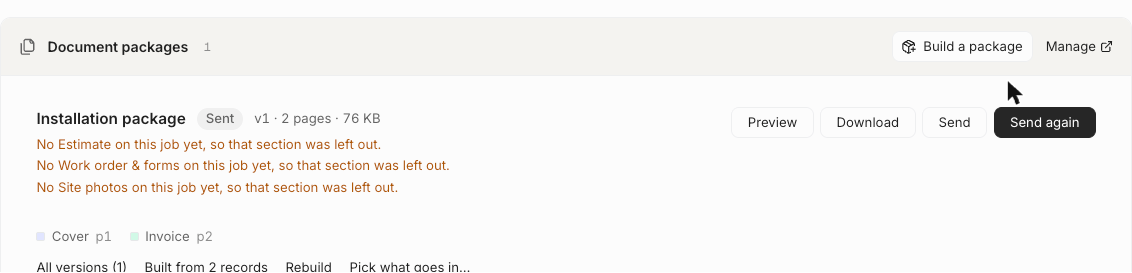
A package is a template. Each time you build it for a record, FieldCamp stores a numbered version of the PDF (v1, v2 and so on) with its page count and size.
What you can put in a package
- A Cover page with your logo and the record's key details.
- A Contents page that lists every page and the page it starts on.
- Estimates and invoices reached through the record, printed in their own designs.
- Forms your team filled in, visit reports, and site photos.
- Product proposal appendices and other records' files and attachments.
- Documents you attach to the package: PDFs or images up to 20 MB each.
See Pages and sources in a document package for every page type and its options.
How packages stay current
When a record a package was built from changes, FieldCamp marks that version Out of date and tells you what changed. You can rebuild it, or send it anyway after confirming. If a page had nothing to print, the version is marked Missing a section instead of failing, so you can see exactly what was left out.
Where you work with packages
| Task | Where |
|---|---|
| Design a package | Settings → Document Templates → Packages. See Create a document package. |
| Build, preview and send a file | The Document packages card on the record. See Build, preview and send a document package. |
| Build and send automatically | A workflow with the Generate Package and Send Package actions. See Automate document packages with workflows. |
Plan and permissions
Document packages are a Pro plan feature, and they are also available during a free trial. People who manage packages need access to document templates in system settings. Building and sending depend on the record and sending permissions listed in Document package permissions and troubleshooting.